Network Services Platform (NSP)#
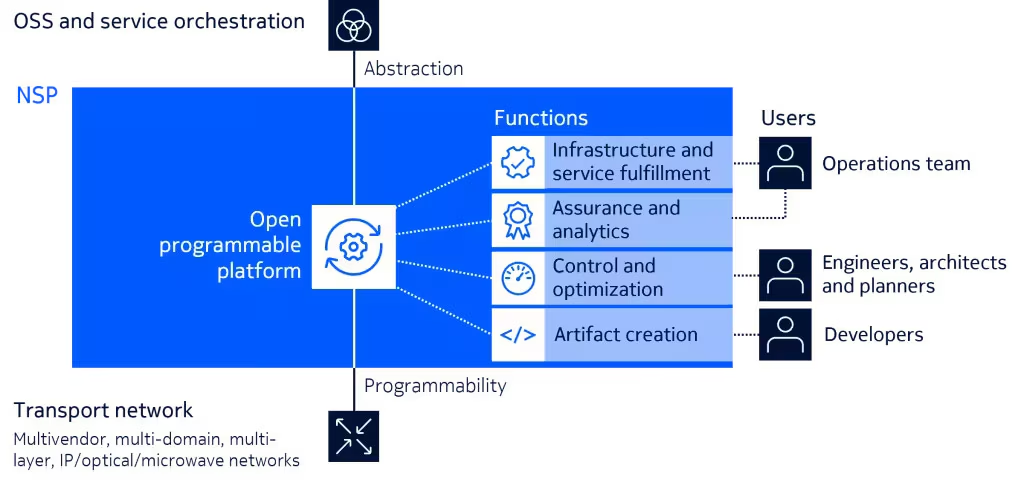
NSP helps you automate your IP, optical and microwave networks to simplify your operations, respond quickly to fast-changing demand, get the most from your resources and ensure maximum service performance and reliability. For the full overview, checkout our official page.
1. Pick an activity and get started#
We’ve prepared a range of activities, grouped by difficulty level (though opinions may vary ).
No need to follow a fixed order. The activity list reshuffles when the page reloads, so jump into whatever activity looks interesting to you.
Activities are here to guide you, not limit you. Want to try something different? Go for it! The team is here to help when you need it.
2. Your space to experiment#
Each group gets an isolated network environment, so changes you make won’t affect anyone else but one thing is shared: the NSP instance.
So access controls are in place to keep everyone out of each other’s way, but please name automation artifacts uniquely (include your group ID) to avoid unexpected surprises.
Curious? Experiment. Something breaks? That’s part of learning.
3. Help us improve the event#
We have two quick asks that genuinely help us improve future events:
- Click Start when you begin an activity (the blue button next to each task). It helps us understand what people have engaged with.
- Complete the short questionnaire at the end, whether the task went smoothly or not. Honest feedback helps us improve (and yes, praise is welcome too ).
Small effort, big impact.
4. Ask us (almost) anything#
Stuck? You’ve got options:
- Check the activity hints and reference material
- Ask your teammates. Collaboration is encouraged.
- Get the event team’s attention. Helping is literally why we’re here.
Working on something interesting or frustrating in your network? Tell us. We like hearing what you’re building, and we will look for ways to help.
5. VS Code Extensions#
The activities presented are primarily UI-driven so anyone can participate, regardless of background. But NSP automation tools are also powered by community-driven, open-source Visual Studio Code extensions built to make automation easier, faster, and more enjoyable.
If you can install VS Code on your machine, go ahead. It’s powerful, free, and makes automation workflows much easier to navigate.
Run into issues? Raise them on GitHub. Found a better way? Contributions are always welcome. That’s how the community grows.
A few NSP extensions we’ve built:
Note
If a local VS Code install is not an option (for example because of admin policy), use code-server in the labs instead. It is the same VS Code experience, hosted in the browser, and it is already deployed for this event, so you can jump in with no extra setup.