Automated network configuration validation#
| Activity name | Automated network configuration validation |
| Activity ID | 22 |
| Short Description | Enhancing network reliability with automated configuration validation ensuring configuration integrity and operational stability leveraging pre-commit and post-commit Python scripts and the pySROS library |
| Difficulty | Intermediate |
| Tools used | pySROS SR OS YANG Models Nokia YANG browser |
| Topology Nodes | PE2 |
| References | SR OS System Management pySROS documentation |
In large-scale networks, manual configuration changes are prone to errors, leading to outages or compliance violations. In this activity you have been asked to build an automated validation pipeline that:
- Intercepts configuration changes before they're committed (pre-commit validation)
- Validates them against predefined rules enforcing your corporate policies and standards
- Verifies the operational state after successful commits (post-commit verification)
This proactive and reactive validation approach significantly reduces the risk of misconfigurations and improves overall network reliability.
1. Technology description#
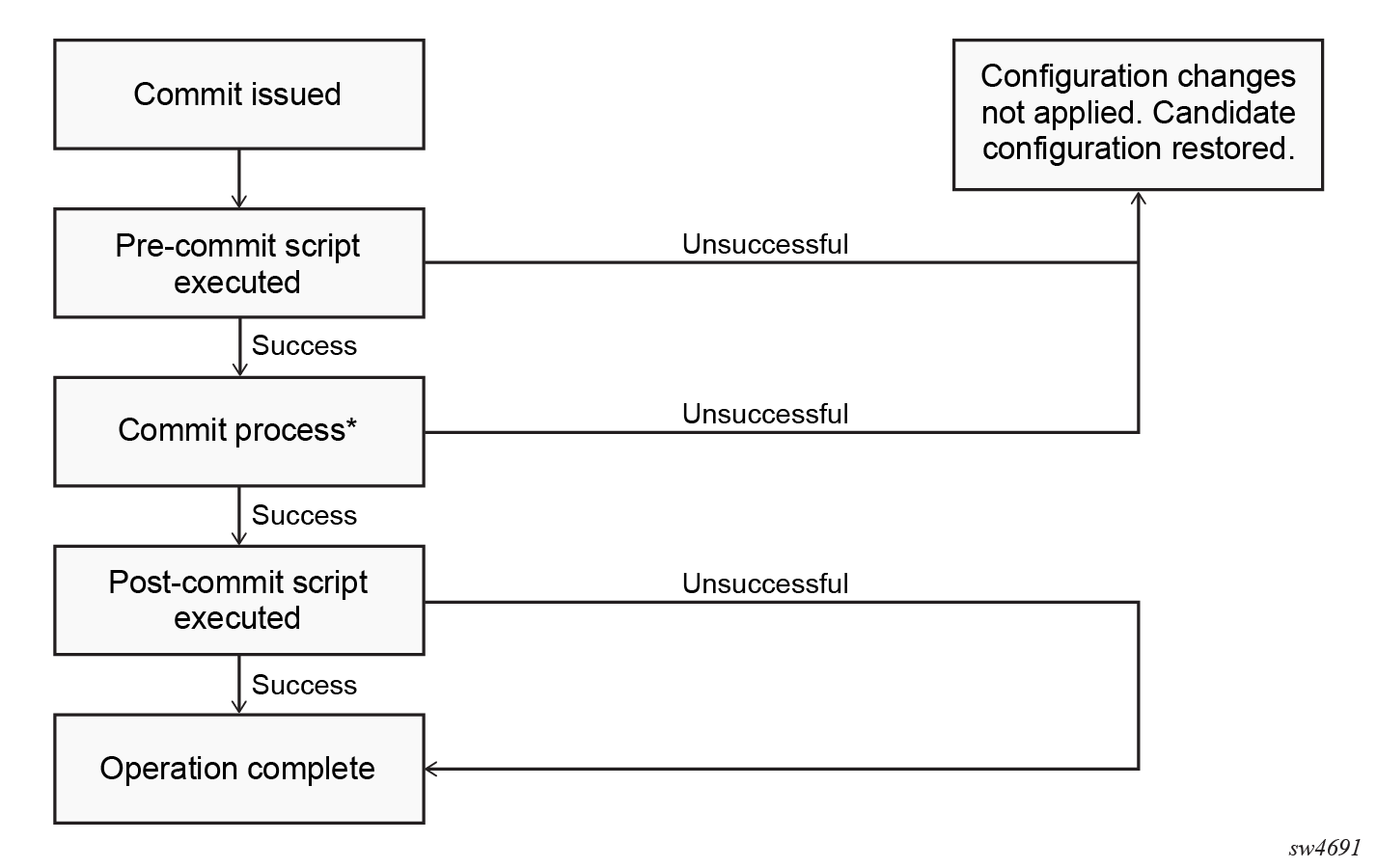
Pre-commit scripts serve as automated compliance gateways to prevent non-compliant configurations from reaching production by inspecting candidate configurations before they are applied, blocking any changes that violate policies. They can also auto-correct technically valid configurations by injecting missing companion settings, to reduce human error and maintain workflow efficiency. In addition they can be used to record operational state prior to a commit taking place that can be used later to validate (perhaps in a post-commit script) that the operational state has not changed.
Post-commit scripts, on the other hand, automate local follow-up actions after a commit, such as logging changes, updating local state, or writing audit records to compact flash. The success or failure of the post-commit script is recorded in device logs (events tmnxPythonPostComScrStarted and tmnxPythonPostComScrFinished), which an external system could consume.
Note
This pre-commit and post-commit script functionality is only available for Python applications stored locally on the SR OS compact flash devices and configured under /configure python python-script.
You can find more information about automatic Python execution before/after commit here.
1.1 Understanding commit scripts#
1.1.1 Pre commit script#
- Execution Timing: Runs after the user issues commit (via MD-CLI, NETCONF, or gNMI) but before the commit process begins.
- Impact: It's success or failure determines whether the commit proceeds.
- Typical Use Case: Validate candidate configuration against organizational policies.
1.1.2 Post commit script#
- Execution Timing: Runs after a successful commit or after a confirmed commit is accepted.
- Impact: It's success or failure does not affect the commit result; the outcome is logged for audit purposes.
- Typical Use Case: Send notifications, trigger automation, or perform compliance audits.
2. Basic configuration#
Python “commit scripts” are standard SR OS Python applications stored locally on compact flash and configured under /configure python python-script. They can be triggered when a commit is issued via MD-CLI, NETCONF, or gNMI.
The following steps are required to configure a "commit script". Connect to PE2 to verify each step.
2.1 Define the Python scripts#
The following configuration already exists on PE2. Check you can identify it now.
(pr)[/configure python]
A:admin@g4-pe2# info
    python-script "pre-script" {
        admin-state enable
        urls ["cf3:pre.py"]
        version python3
    }
2.2 Attach the python-script as commit script#
The following configuration already exists on PE2. Check you can identify it now.
(pr)[/configure system management-interface commit-management]
A:admin@g4-pe2# info
    python-scripts {
        pre-commit-python-script "pre-script"
    }
2.3 Control which interfaces trigger the pre/post-commit scripts#
The following configuration already exists on PE2. Check you can identify it now.
(pr)[/configure system management-interface commit-management]
A:admin@g4-pe2# info detail
    python-scripts {
        pre-commit-python-script "pre-script"
        md-cli-trigger true
        netconf-trigger true
        gnmi-trigger true
    }
2.4 Monitoring and events#
SR OS generates log events notifications when commit scripts start and finish, including success or failure.
The following configuration already exists on PE2. Check you can identify it now.
(pr)[/configure log]
A:admin@g4-pe2# info
    filter "python-only" {
        default-action drop
        named-entry "1" {
            action forward
            match {
                application {
                    eq python
                }
            }
        }
    }
    log-id "33" {
        admin-state enable
        description "Python pre/post-commit events"
        filter "python-only"
        source {
            change true
            debug true
        }
        destination {
            memory {
                max-entries 1000
            }
        }
    }
log Python events
A:admin@g4-pe2# show log log-id 33

===============================================================================
Event Log 33 log-name 33
===============================================================================
Description : Python pre/post-commit events
Memory Log contents  [size=1000   next event=5  (not wrapped)]

4 2026/03/10 10:33:36.854 UTC MINOR: PYTHON #2003 Base PYTHON
"pre-commit Python script 'pre-script' completed successfully"

3 2026/03/10 10:33:36.836 UTC MINOR: PYTHON #2002 Base PYTHON
"pre-commit Python script 'pre-script' started"

2 2026/03/10 10:33:26.352 UTC MINOR: PYTHON #2003 Base PYTHON
"pre-commit Python script 'pre-script' failed with error: 'Exception: Pre-commit validation failed'"

1 2026/03/10 10:33:26.330 UTC MINOR: PYTHON #2002 Base PYTHON
"pre-commit Python script 'pre-script' started"
Temporarily Disable Commit Scripts
To skip both pre- and post-commit scripts for only the next commit:
This command disables script execution for the next commit only, then automatically re-enables them afterward.3. Tasks#
You should read these tasks from top-to-bottom before beginning the activity.
While it may be tempting to jump ahead, each task builds upon the previous one. Completing them in sequence ensures you understand the full workflow.
The core skill throughout all the following tasks is to practice writing Python scripts that integrate with SR OS's commit lifecycle using pySROS, specifically using connect(use_existing_candidate=True) to inspect and optionally modify the candidate configuration before it is applied to the network.
For all upcoming tasks, you'll develop your Python script in cf3:/pre.py. Remember to reload your script after each change before testing:
Reload Python Script
Assuming you have configured your python-script to be named pre-script:
You can verify the python-script after reloading, using below command:
python-script Configuration Verification
A:admin@g4-pe2# show python python-script "pre-script"

===============================================================================
Python script "pre-script"
===============================================================================
Description   : (Not Specified)
Admin state   : inService
Oper state    : inService
Oper state
(distributed) : inService
Version       : python3
Action on fail: drop
Protection    : none
Primary URL   : cf3:pre.py
Secondary URL : (Not Specified)
Tertiary URL  : (Not Specified)
Active URL    : primary
Run as user   : (Not Specified)
Code size     : 1267
Last changed  : 03/10/2026 10:02:20
===============================================================================
3.1 Minimal pre‑commit script#
The goal of this task is to familiarize yourself with the commit lifecycle by creating the simplest possible pre-commit script that logs a message and always allows the commit to proceed.
-
Write a minimal pySROS script in
cf3:/pre.pythat:-
Connects to the existing candidate using
use_existing_candidate=True. Check the relevant pySROS documentation for pointers. -
Retrieves interface names from both candidate and running datastores using
.get()function. Obtaining data guide -
Logs the output of each step to a predefined log file using a
script-policy. Don't forget to make the directory incf3:/where the python script results are going to be saved,file make-directory cf3:/commit/.
If you get stuck: Sample pySROS script to inspect the candidate
from pysros.management import connect def main(): log_file_path = "cf3:/commit/pre_commit_log.txt" # Open log file for writing with open(log_file_path, "w") as log_file: log_file.write("### PRE-COMMIT SCRIPT STARTED ###\n") log_file.write( "Running as pre-commit script: Connecting to existing candidate.\n" ) connection_object = connect(use_existing_candidate=True) # --- Access the configuration source --- candidate_config = connection_object.candidate running_config = connection_object.running # --- Step 1: Get the router name(s) --- all_routers_config = candidate_config.get("/configure/router") router_name = next(iter(all_routers_config.keys())) # --- Step 2: Get interfaces --- candidate_interfaces_path = ( "/configure/router[router-name='{}']/interface".format(router_name) ) running_interfaces_path = ( "/configure/router[router-name='{}']/interface".format(router_name) ) candidate_interfaces = ( candidate_config.get(candidate_interfaces_path) or {} ) running_interfaces = running_config.get(running_interfaces_path) or {} # Debugging output log_file.write( "DEBUG: Candidate interfaces: {}\n".format( candidate_interfaces.keys() ) ) log_file.write( "DEBUG: Running interfaces: {}\n".format(running_interfaces.keys()) ) if __name__ == "__main__": main() -
-
Reload the script and commit a small configuration change (like add a
descriptionto an interface, ...): -
Verify the output in the log file using the command
/file show cf3:/commit/pre_commit_log.txt. An aliasshow pre-commithas been configured for convenience:File: pre_commit_log.txt ------------------------------------------------------------------------------- ### PRE-COMMIT SCRIPT STARTED ### Running as pre-commit script: Connecting to existing candidate. DEBUG: Candidate interfaces: dict_keys(['p1', 'system', 'spine12', 'spine11', 'p2']) DEBUG: Running interfaces: dict_keys(['p1', 'system', 'spine12', 'spine11', 'p2']) ===============================================================================
3.2 Soft validation (Warn but do not block)#
So far you have implemented the base functionality for the objective without enforcing any rules. This is a great start! Now you will implement a “warning only” check for missing interface descriptions before moving to enforcement activities.
-
Modify
pre.pyto log warnings without blocking commits:- Use similar logic to the "Minimal pre-commit script" task, but do not raise an exception or cause the script to fail.
- Send log messages similar to:
WARNING: Interface 'x' is missing a description.
If you get stuck: Sample pySROS script to send warnings
from pysros.management import connect def main(): log_file_path = "cf3:/commit/pre_commit_log.txt" # Open log file for writing with open(log_file_path, "w") as log_file: log_file.write("### PRE-COMMIT SCRIPT STARTED ###\n") log_file.write( "Running as pre-commit script: Connecting to existing candidate.\n" ) connection_object = connect(use_existing_candidate=True) # --- Access the configuration source --- candidate_config = connection_object.candidate running_config = connection_object.running # --- Step 1: Get the router name(s) --- all_routers_config = candidate_config.get("/configure/router") if not all_routers_config: log_file.write( "Pre-commit soft check: no routers found in candidate config.\n" ) router_name = next(iter(all_routers_config.keys())) # --- Step 2: Get interfaces --- candidate_interfaces_path = ( "/configure/router[router-name='{}']/interface".format(router_name) ) running_interfaces_path = ( "/configure/router[router-name='{}']/interface".format(router_name) ) candidate_interfaces = ( candidate_config.get(candidate_interfaces_path) or {} ) running_interfaces = running_config.get(running_interfaces_path) or {} # Soft validation: only print warnings, do NOT raise an exception missing_desc = False for intf_name_leaf, intf_data in candidate_interfaces.items(): intf_name = str(intf_name_leaf) # Consider only new interfaces (present in candidate, not in running) if intf_name not in running_interfaces: if ( "description" not in intf_data or not str(intf_data["description"]).strip() ): log_file.write( "WARNING: Interface '{}' is missing a description " "(soft validation only, commit will proceed).".format( intf_name ) ) missing_desc = True if not missing_desc: log_file.write( "Pre-commit soft check: all new interfaces have descriptions." ) if __name__ == "__main__": main() -
Reload the script.
-
Create a new interface in a candidate mode (global or private) without a description. Commit it and check the logs.
Expected result and outputs following interface configurationA:admin@g4-pe2# /configure router interface test-1 admin-state enable *(pr)[/configure router "Base"] A:admin@g4-pe2# commit (pr)[/configure router "Base"] A:admin@g4-pe2# show pre-commit File: pre_commit_log.txt ------------------------------------------------------------------------------- ### PRE-COMMIT SCRIPT STARTED ### Running as pre-commit script: Connecting to existing candidate. WARNING: Interface 'test-1' is missing a description (soft validation only, commit will proceed). ===============================================================================Confirm that:
- The commit succeeds
- Warning messages appear in the log file
3.3 Hard validation, or strict enforcement (Block commits on policy violation)#
The goal of this task is to transform the soft validation into an enforcement gate that blocks commits when policies are violated. The policy here requires all interfaces to have a description.
-
Modify
pre.pyto raise an exception when any new interface lacks a description.If you get stuck: Sample pySROS script to block commits on policy violation
from pysros.management import connect def main(): log_file_path = "cf3:/commit/pre_commit_log.txt" # Open log file for writing with open(log_file_path, "w") as log_file: log_file.write("### PRE-COMMIT SCRIPT STARTED ###\n") log_file.write( "Running as pre-commit script: Connecting to existing candidate.\n" ) connection_object = connect(use_existing_candidate=True) # --- Access the configuration source --- candidate_config = connection_object.candidate running_config = connection_object.running # --- Step 1: Get the router name(s) --- all_routers_config = candidate_config.get("/configure/router") if not all_routers_config: log_file.write( "Pre-commit soft check: no routers found in candidate config.\n" ) router_name = next(iter(all_routers_config.keys())) # --- Step 2: Get interfaces --- candidate_interfaces = ( candidate_config.get( "/configure/router[router-name='{}']/interface".format( router_name ) ) or {} ) running_interfaces = ( running_config.get( "/configure/router[router-name='{}']/interface".format( router_name ) ) or {} ) # Hard Validation: Block Commits with missing descriptions by raising an exception validation_failed = False for intf_name_leaf, intf_data in candidate_interfaces.items(): intf_name = str(intf_name_leaf) if intf_name not in running_interfaces: if ( "description" not in intf_data or not str(intf_data["description"]).strip() ): log_file.write( "ERROR: Interface '{}' is missing a description.".format( intf_name ) ) validation_failed = True if validation_failed: log_file.write( "ERROR: Pre-commit validation failed. Blocking commit.\n" ) raise Exception( "Pre-commit validation failed: missing interface descriptions." ) log_file.write("Pre-commit validation passed.\n") if __name__ == "__main__": main() -
Reload the script.
-
Attempt to commit a new interface without description:
Expected result and outputs following interface configurationConfirm that:(pr)[/configure router "Base"] A:admin@g4-pe2# interface test-2 admin-state enable *(pr)[/configure router "Base"] A:admin@g4-pe2# commit MINOR: MGMT_CORE #2507: Python execution failed - Exception: Pre-commit validation failed: missing interface descriptions. INFO: MGMT_CORE #2608: Commit script failed - commit not applied because of pre-commit script failure *(pr)[/configure router "Base"] A:admin@g4-pe2# show pre-commit File: pre_commit_log.txt ------------------------------------------------------------------------------- ### PRE-COMMIT SCRIPT STARTED ### Running as pre-commit script: Connecting to existing candidate. ERROR: Interface 'test-2' is missing a description.ERROR: Pre-commit validation failed. Blocking commit. ===============================================================================- The commit fails
- The failure message is visible in both the CLI and logs
-
Fix the configuration (add the interface
description) and commit again.Expected result and outputs following interface configuration*(pr)[/configure router "Base"] A:admin@g4-pe2# interface test-2 description test-2-description *(pr)[/configure router "Base"] A:admin@g4-pe2# commit (pr)[/configure router "Base"] A:admin@g4-pe2# show pre-commit File: pre_commit_log.txt ------------------------------------------------------------------------------- ### PRE-COMMIT SCRIPT STARTED ### Running as pre-commit script: Connecting to existing candidate. Pre-commit validation passed. ===============================================================================
3.4 Auto correct the candidate using set(commit=False)#
Excellent work! You now have automated the enforcement of your companies policy on interface descriptions. It would be great if the device could automatically deploy default company approved descriptions if they were not provided by the operator.
The objective of this task is to learn how a pre-commit script can automatically fix the candidate configuration instead of just rejecting it. Look to Executing before/after commit for some pointers on executing Python scripts right before a commit.
-
Extend
pre.pyto set a default description usingset(..., commit=False)for each new interface missing a description so that the commit process will later apply the updated candidate. The key change is replacing the hard-blockingraise Exceptionwith aset(..., commit=False)call to auto-correct missing descriptions in the candidate configuration before the commit proceeds.If you get stuck: Sample pySROS script to use
set(commit=False)to auto-correct the candidatefrom pysros.management import connect def main(): log_file_path = "cf3:/commit/pre_commit_log.txt" # Open log file for writing with open(log_file_path, "w") as log_file: log_file.write("### PRE-COMMIT SCRIPT STARTED ###\n") log_file.write( "Running as pre-commit script: Connecting to existing candidate.\n" ) connection_object = connect(use_existing_candidate=True) # --- Access the configuration source --- candidate_config = connection_object.candidate running_config = connection_object.running # --- Step 1: Get the router name(s) --- all_routers_config = candidate_config.get( "/nokia-conf:configure/router" ) if not all_routers_config: log_file.write( "Pre-commit soft check: no routers found in candidate config.\n" ) return router_name = next(iter(all_routers_config.keys())) # --- Step 2: Get interfaces --- candidate_interfaces = ( candidate_config.get( "/nokia-conf:configure/router[router-name='{}']/interface".format( router_name ) ) or {} ) running_interfaces = ( running_config.get( "/nokia-conf:configure/router[router-name='{}']/interface".format( router_name ) ) or {} ) # --- Step 3: Auto-correct missing descriptions using set(commit=False) --- for intf_name_leaf, intf_data in candidate_interfaces.items(): intf_name = str(intf_name_leaf) if intf_name not in running_interfaces: if ( "description" not in intf_data or not str(intf_data.get("description", "")).strip() ): log_file.write( "INFO: Interface '{}' is missing a description. " "Auto-correcting with default description.\n".format( intf_name ) ) # Set a default description without committing, # so the updated candidate is used by the commit process. connection_object.candidate.set( "/nokia-conf:configure/router[router-name='{}']/interface[interface-name='{}']/description".format( router_name, intf_name ), "AUTO: added by pre-commit", commit=False, ) log_file.write( "INFO: Default description set for interface '{}'.\n".format( intf_name ) ) log_file.write("Pre-commit validation and auto-correction complete.\n") if __name__ == "__main__": main() -
Reload the script.
-
Create a new interface without a description and commit.
Expected result and outputs following interface configuration(pr)[/configure router "Base"] A:admin@g4-pe2# interface test-3 admin-state enable *(pr)[/configure router "Base"] A:admin@g4-pe2# commit (pr)[/configure router "Base"] A:admin@g4-pe2# show pre-commit File: pre_commit_log.txt ------------------------------------------------------------------------------- ### PRE-COMMIT SCRIPT STARTED ### Running as pre-commit script: Connecting to existing candidate. INFO: Interface 'test-3' is missing a description. Auto-correcting with default description. INFO: Default description set for interface 'test-3'. Pre-commit validation and auto-correction complete. =============================================================================== -
After the commit, verify that the description was automatically added.
3.5 Simple post-commit audit script#
The goal of this task is to write a basic post-commit script that inspects the running configuration after commit and reports missing descriptions. Look at the executing before/after commit documentation for some pointers on executing Python scripts immediately after a commit.
-
Create
cf3:/post.pyto develop the post-commit Python script in: -
Configure the
post-commitscript and configure it in thecommit-managementcontainer./configure python python-script "post-script" admin-state enable /configure python python-script "post-script" urls ["cf3:/post.py"] /configure python python-script "post-script" version python3 /configure system management-interface commit-management python-scripts post-commit-python-script "post-script"*(pr)[/configure] A:admin@g4-pe2# commit (pr)[/configure] A:admin@g4-pe2# show python python-script "post-script" =============================================================================== Python script "post-script" =============================================================================== Description : (Not Specified) Admin state : inService Oper state : inService Oper state (distributed) : inService Version : python3 Action on fail: drop Protection : none Primary URL : cf3:/post.py Secondary URL : (Not Specified) Tertiary URL : (Not Specified) Active URL : primary Run as user : (Not Specified) Code size : 929 Last changed : 04/03/2026 11:43:35 =============================================================================== -
Write a Python script which connects to the running configuration after a commit performs an audit, reporting any interfaces missing a description.
If you get stuck: Sample pySROS script for a short post commit audit
from pysros.management import connect def main(): log_file_path = "cf3:/commit/post_commit_log.txt" # Open log file for writing with open(log_file_path, "w") as log_file: log_file.write("### POST-COMMIT SCRIPT STARTED ###\n") log_file.write( "Running as post-commit script: Connecting to inspect running configuration.\n" ) connection_object = connect() # --- Access the running configuration --- running_config = connection_object.running # --- Step 1: Get the router name(s) --- all_routers_config = running_config.get("/nokia-conf:configure/router") if not all_routers_config: log_file.write( "Post-commit check: no routers found in running config.\n" ) return router_name = next(iter(all_routers_config.keys())) # --- Step 2: Get interfaces from running config --- running_interfaces = ( running_config.get( "/nokia-conf:configure/router[router-name='{}']/interface".format( router_name ) ) or {} ) # --- Step 3: Report interfaces missing a description --- missing_description = [] for intf_name_leaf, intf_data in running_interfaces.items(): intf_name = str(intf_name_leaf) if ( "description" not in intf_data or not str(intf_data.get("description", "")).strip() ): missing_description.append(intf_name) log_file.write( "WARNING: Interface '{}' is missing a description in running config.\n".format( intf_name ) ) if missing_description: log_file.write( "Post-commit report: {} interface(s) missing descriptions: {}\n".format( len(missing_description), missing_description ) ) else: log_file.write( "Post-commit report: All interfaces have descriptions. No issues found.\n" ) log_file.write("### POST-COMMIT SCRIPT COMPLETED ###\n") if __name__ == "__main__": main() -
Reload the post-script after you have finished editing it.
-
Commit a configuration change and check the logs for the audit summary.
Expected result and outputs following interface configuration(pr)[/configure router "Base"] A:admin@g4-pe2# interface test-4 admin-state enable *(pr)[/configure router "Base"] A:admin@g4-pe2# commit (pr)[/configure router "Base"] A:admin@g4-pe2# show post-commit File: post_commit_log.txt ------------------------------------------------------------------------------- ### POST-COMMIT SCRIPT STARTED ### Running as post-commit script: Connecting to inspect running configuration. WARNING: Interface 'p2' is missing a description in running config. WARNING: Interface 'spine12' is missing a description in running config. WARNING: Interface 'p1' is missing a description in running config. WARNING: Interface 'spine11' is missing a description in running config. WARNING: Interface 'system' is missing a description in running config. WARNING: Interface 'test-1' is missing a description in running config. Post-commit report: 6 interface(s) missing descriptions: ['p2', 'spine12', 'p1', 'spine11', 'system', 'test-1'] ### POST-COMMIT SCRIPT COMPLETED ### ===============================================================================
4. Summary#
Congratulations! If you've completed all the tasks above, you've successfully built an automated network configuration validation pipeline and achieved the following learning objectives:
- You have seen how to navigate the configuration trees.
- You have examined the pre-commit logic without risking blocked commits.
- You have automatically enforced policy on router configuration.
- You implemented an AutoCorrect pattern.
- You have seen the difference between pre- and post-commit behavior.
- You have written a Python application to enforce your corporate standards policies.