Enable PQC service encryption with ANYsec#
| Activity name | Enable service-level Post-Quantum Cryptography (PQC) encryption with ANYsec |
| Activity ID | 19 |
| Short Description | With the rise of global cyber-attacks compromising sensitive data and critical services, governments, security institutions, telecommunications regulators, and CSPs are prioritizing robust, future-proof communications. You are part of a CSP’s IP Network team tasked with deploying Post-Quantum Cryptography (PQC) encryption on-demand for critical services within a Nokia FP5-based network utilizing ANYsec capabilities. In this activity, you will enable per-service PQC encryption for distinct customers, using gNMIc for automated deployment and observing the encrypted traffic on the line to ensure end-to-end security per service. |
| Difficulty | Beginner |
| Tools used | Containerlab VS Code Extension MD-CLI Explorer Nokia YANG Browser EdgeShark Wireshark gNMIc |
| Topology Nodes | PE2, PE3, Client02, Client03 |
| References | ANYsec user Guide ANYsec MD-CLI guide ANYsec application note |
1. Objective#
You are part of a CSP’s IP Network team tasked with deploying Post-Quantum Cryptography (PQC) encryption on-demand for critical services within a Nokia FP5-based network utilizing ANYsec capabilities.
Your customers are requesting you to provide quantum-safe transport encryption for their existing services.
Your first thought was MACsec, however your network is multivendor IP/MPLS network with third-party P-routers and not all line cards are MACsec capable. Moreover, your network spans several countries using some circuits from other CSPs and some routers are hosted in third-party facilities. The requirement is end-to-end security, and allowing data to be decrypted at every hop is not an option. Some mission-critical customers even demand a unique PSK per service.
IPSec is not an option either: it does not scale, its not line rate, does not meet the SLAs, requires more hardware and network design to divert data and its not flexible for large networks with multi-point services.
Your PE nodes are Nokia FP5-based routers and the Nokia ANYsec solution is the perfect option to meet these requirements.
In this activity, you will enable per-service PQC encryption for distinct customers and services, using gNMIc for automated deployment (creating, deleting, or toggling encryption) and observing the encrypted traffic on the line to ensure end-to-end security per service.
For this activity you will use the FP5-based routers PE2 and PE3 to configure an IP/MPLS service with ANYsec transport between Client02 and Client03 (distinct logical interfaces are used to emulate multiple customers).
The Fig. 1. below highlights the FP5 PEs and clients that will be used in this activity:
In this activity you will explore ANYsec configurations, analyze its encryption and authentication mechanisms, and understand its role in quantum-safe security strategies.
2. Technology explanation#
2.1 ANYsec: A scalable and high-performance PQC data encryption solution#
With the growing need to protect data transport, driven by increasingly sophisticated threats and the developments in quantum computing, networks require encryption solutions that are both high-performance and scalable.
MACsec (Media Access Control Security) is a Layer 2 security protocol standardized by the IEEE under 802.1AE, designed to secure Ethernet communications on a per-link basis. It's a mature and widely trusted technology that provides line-rate, hardware-based quantum-safe encryption, integrity, and confidentiality at Layer 2. Key management is handled via 802.1X in conjunction with the MACsec Key Agreement (MKA) protocol, enabling dynamic establishment and rotation of encryption keys. You may try this technology in the MACsec activity .
ANYSec represents the evolution of MACsec for IP/MPLS networks, extending its capabilities beyond physical links to enable encryption at the service level. By building on IEEE 802.1AE MACsec and IEEE 802.1X MKA standards, ANYSec delivers scalable, flexible, line-rate, and high-performance end-to-end protection across IP/MPLS infrastructures. ANYSec is a low-latency, line-rate, scalable, flexible, and quantum-safe network encryption solution that enables authentication and encryption across Layer 2, Layer 2.5 and Layer 3 networks. It supports Segment Routing (SR) protocols, including SR-ISIS, SR-OSPF, and SR-OSPFv3, and encapsulates the MACsec Key Agreement (MKA) protocol over IP/UDP. Additionally, ANYSec leverages Flex-Algo or multi-instance IGP for tunnel slicing and offers per-service encryption. Its innovative approach to service-level encryption ensures robust security while maintaining network efficiency.
If you attend last year's hackathon, you may have noticed we had the ANYsec tunnel encryption/slicing activity. This one was focussed on tunnel encryption that is an interesting option if you want to implement network security slicing, having distinct transport tunnels and mapping the services to those tunnels.
This year's activity will focus on the per service network encryption feature, where you can have the same transport tunnel with services in both clear and encrypted.
3. Lab topology overview#
For this activity we will focus on a subset of the main topology, considering only the SR OS Provider Edge (PE) routers and client nodes. The PE2 and PE3 nodes are FP5-based and will be configured with ANYsec to provide quantum-safe transport between Customer A and Customer B services, hosted at Client02 and Client03, as highlighted in Fig. 2. below:
The network is already configured with IGP, MPLS/Segment-routing, BGP and customer services.
4. Tasks#
You should read these tasks from top-to-bottom before beginning the activity.
It is tempting to skip ahead but tasks may require you to have completed previous tasks before tackling them.
In this activity your tasks are (do not start yet!):
- Inspect service packets: Test and validate existing services for customer A and B and use EdgeShark to inspect if data is encrypted.
- Verify ANYsec configurations: Verify existing customer ANYsec configurations and building blocks for ANYsec per service encryption.
- Configure service encryption with
gnmiccalls: Configure per service encryption for customer B withgnmiccalls using distinct Encryption-groups. - Troubleshoot with
gnmic: Troubleshoot a configuration error withgnmic. - Test network failure: Create a datapath network failure on links towards a
Prouter to observe that ANYsec, as any other MPLS packets, are not impacted. - Toggle ANYsec: Finally, you'll use the ANYsec toggle script to enable/disable encryption per service on demand.
4.1 Inspect service packets#
Both customer A and B requested their services to be encrypted.
Your colleagues were in charge to deploy the configurations, but now you are taking over these tasks from them. They are using gnmic with json files to deploy the configurations and they told you that only some PE2 configurations are missing.
Your first task is to execute the following command on your hackathon instance to deploy the PE2 configurations:
Warning
Execute the following command to apply the missing configurations.
Note that the file is under the hackathon repository folder SReXperts. Ensure you execute the correct path or adjust the command if needed.
You should get a successful execution as shown below.
$ gnmic -a clab-srexperts-pe2 -u admin -p $EVENT_PASSWORD --insecure set \
    --request-file pe2_anysec_set.json
{
  "source": "clab-srexperts-pe2",
  "timestamp": 1778884104817197381,
  "time": "2026-05-15T18:28:24.817197381-04:00",
  "results": [
    {
      "operation": "UPDATE",
      "path": "configure/anysec"
    },
    {
      "operation": "UPDATE",
      "path": "configure/service/epipe[service-name=Svc-A_Epipe]"
    }
  ]
}
Now that everything is configured, you should confirm that everything was deployed successfully.
You will now test connectivity for customer A and B services (hosted at Client02 and Client03) and use EdgeShark to inspect if data is encrypted for both services.
There are two VLL services for Customer A and B as illustrated in Fig. 3 below:
Start a packet capture at PE3 interfaces 1/1/c1/1 and 1/1/c2/1. You may use EdgeShark WebUI or from VSCode ContainerLab plugin, or other options as listed below.
Note
Packet capture options
For more details about the Containerlab packet capture options refer to tools guide: Containerlab Capture traffic options .
You may use the EdgeShark WEB UI directly with the URL: http://${INSTANCE_ID}.srexperts.net:5001
You may use EdgeShark from VSCode ContainerLab plugin by selecting a node interface in the ContainerLab explorer menu.
Other options are TCPDump or TShark.
Warning
Currently SR-SIM packet captures only display ingress packets (For ping requests Wireshark will report that "no response found!"). You don't need to, but if you want to see both directions you may also capture PE2 interfaces 1/1/c1/1 and 1/1/c2/1.
First test the connectivity for Customer service A between Client02 and Client03.
Ping from Client02 to Client03 using service A.
[*]─[client02]─[/]
└──> ping -c 4 192.168.52.3
PING 192.168.52.3 (192.168.52.3) 56(84) bytes of data.
64 bytes from 192.168.52.3: icmp_seq=1 ttl=64 time=2.85 ms
64 bytes from 192.168.52.3: icmp_seq=2 ttl=64 time=2.84 ms
64 bytes from 192.168.52.3: icmp_seq=3 ttl=64 time=3.18 ms
64 bytes from 192.168.52.3: icmp_seq=4 ttl=64 time=2.53 ms

--- 192.168.52.3 ping statistics ---
4 packets transmitted, 4 received, 0% packet loss, time 3005ms
rtt min/avg/max/mdev = 2.533/2.848/3.176/0.227 ms

[*]─[client02]─[/]
Question: Do you see the ICMP packets in your capture? Are they encrypted or in clear text?
The packets should be encrypted as expected since ANYsec was configured for service A.
The ping should succeed and you should see them as MPLS packets with the payload encrypted/not decoded (unless you have ANYsec Wireshark dissectors).
Info: Wireshark ANYsec headers dissectors
By default, the Wireshark does not decode ANYsec headers, the packets are shown as MPLS packets with ANYsec headers not decoded. You need Wireshark dissectors plugins to decode the headers.
You can still distinguish ANYsec encrypted packets by looking to the Encryption Label (MPLS label) and verify it is within the configured ANYsec MPLS label range.
In this setup, the configured ANYsec mpls label range is between 2000 and 5999. An mpls label in this range identifies an encryption SID. The outputs below display the label 2301.
Optionally you may consider to install the ANYsec Packet Dissectors for Wireshark, you just need to copy the dissector files to your Wireshark plugin folder.
The fig. 4 below compares the wireshark display with and without ANYsec dissectors:
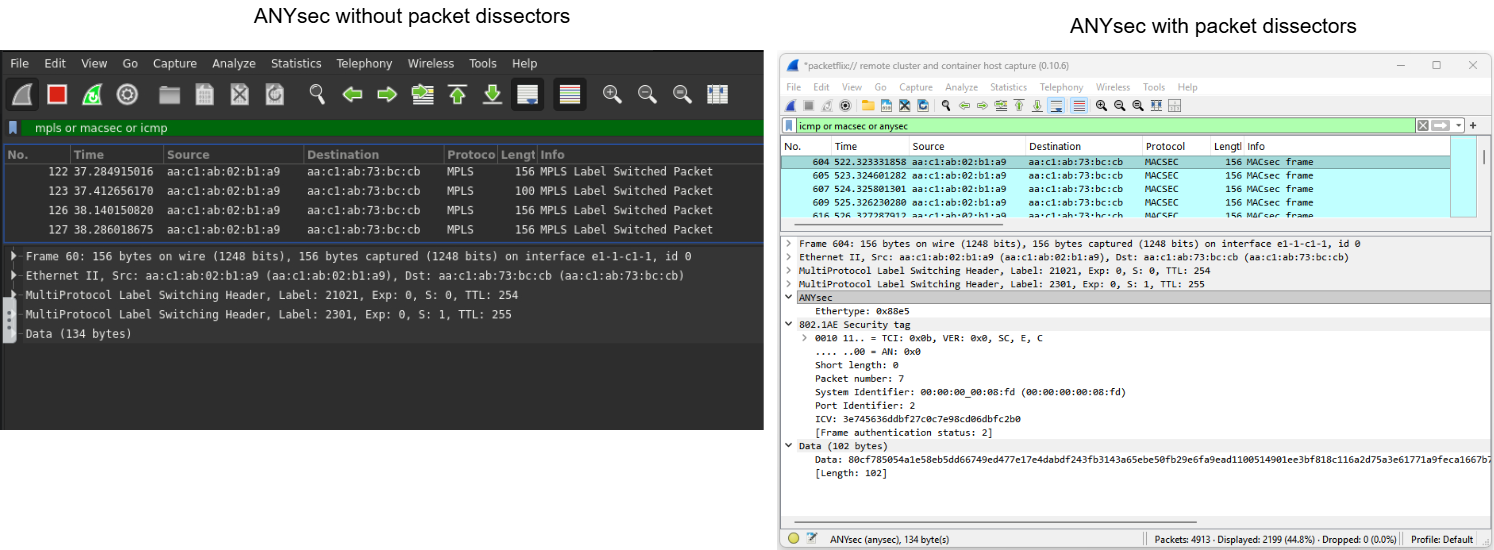
Note that the output using dissectors also displays the ANYsec Ethertype and the MACsec header. The Ethertype 0x88E5 is used to identify packets containing information related to the MACsec (Media Access Control Security) protocol.
You can verify that the configured ANYsec mpls label range with is between 2000 and 5999.
2026-05-10T10:06:11.70+00:00
(gl)[/configure router "Base" mpls-labels reserved-label-block "Anysec"]
A:admin@g51-pe2# info
    start-label 2000
    end-label 5999
You can also verify all the label ranges configured.
A:admin@g51-pe2# /show router mpls-labels label-range

===============================================================================
Label Ranges
===============================================================================
Label Type      Start Label End Label   Aging       Available   Total
-------------------------------------------------------------------------------
Static          32          1999        -           1968        1968
Dynamic         2000        524287      0           492895      522288
    Seg-Route   21000       30000       -           0           9001

-------------------------------------------------------------------------------
Reserved Label Blocks
-------------------------------------------------------------------------------
Reserved Label                               Start       End         Total
Block Name                                   Label       Label
-------------------------------------------------------------------------------
Anysec                                       2000        5999        4000
srv6-ublock-128                              40001       48191       8191
srv6-ublock-base                             30001       38191       8191
-------------------------------------------------------------------------------
No. of Reserved Label Blocks: 3
-------------------------------------------------------------------------------
===============================================================================
Secondly test the connectivity for Customer service B between Client02 and Client03.
Ping from Client02 to Client03 using service B.
[x]─[client02]─[/]
└──> ping -c 4 192.168.53.3
PING 192.168.53.3 (192.168.53.3) 56(84) bytes of data.
64 bytes from 192.168.53.3: icmp_seq=1 ttl=64 time=2.80 ms
64 bytes from 192.168.53.3: icmp_seq=2 ttl=64 time=2.73 ms
64 bytes from 192.168.53.3: icmp_seq=3 ttl=64 time=2.60 ms
64 bytes from 192.168.53.3: icmp_seq=4 ttl=64 time=2.59 ms

--- 192.168.53.3 ping statistics ---
4 packets transmitted, 4 received, 0% packet loss, time 3004ms
rtt min/avg/max/mdev = 2.593/2.680/2.800/0.088 ms

[*]─[client02]─[/]
Question: Do you see the ICMP packets in your capture? Are they encrypted or in clear text?
The ping should succeed but you should see ICMP packets encapsulated in MPLS with the payload in clear text in the capture.
The packets in clear indicate that there's something wrong with ANYsec configurations for service B that will require you to troubleshoot and resolve.
You will do this in the following section.
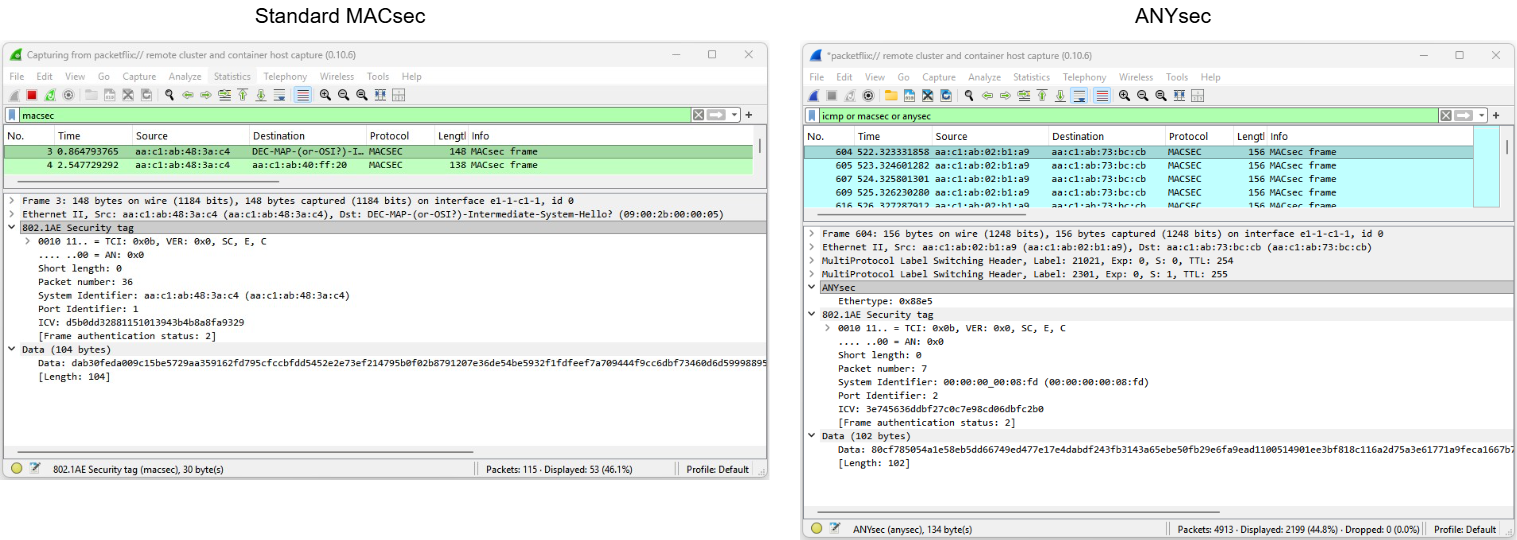
Question: Is there any difference between MACsec and ANYsec protocol stack?
Yes, MACsec is an L2 protocol that pushes the MACsec header after the Ethernet header and encrypts all the remaining payload (MACsec WAN mode allows VLANs in clear).
With ANYsec, the MPLS transport labels stack are in clear and unauthenticated. The Encryption SID and the ANYsec header are included on top of the MPLS transport stack. This allows the LSR routers to manipulate the MPLS label stack while the system encrypts and authenticates the payload.
The fig. 5 below compares a MACsec and an ANYsec packet capture (full explanation in the user guide):
Note: For MACsec details you may refer to the MACsec activity.
4.2 Verify ANYsec configurations#
In the previous task you confirmed that service A is indeed encrypted as expected, but service B is not and requires some attention, but first you will verify existing customer A configurations to understand the required building blocks to enable ANYsec per service.
On PE2 discover which service is used for Service A and inspect the configurations. Do you notice any special configuration?
Solution
The service is the epipe Svc-A_Epipe.
You will notice that under the spoke-sdp there is an anysec-encryption-group mapping.
There is no required configuration on the SDP.
(gl)[/configure service epipe "Svc-A_Epipe"]
A:admin@g51-pe2# info
    admin-state enable
    description "Epipe Svc A"
    service-id 1002
    customer "1"
    service-mtu 8100
    spoke-sdp 2333:1002 {
        admin-state enable
        anysec-encryption-group "EG_A"   ### ANYsec per service
    }
    sap 1/1/c6/1:1002 {
        admin-state enable
        ethernet {
            llf {
                admin-state disable
            }
        }
    }
Inspect the anysec-encryption-group configurations used by service A and all related ANYsec configurations. You should be able to answer the following questions:
- What is the
encryption-groupconfiguration context? - What is the
security-termination-policiesconfiguration context? - What is the
connectivity-associationconfiguration context? - What is the MKA UDP port?
- What is the ANYsec reserved label block?
Solution
The answers are:
1. /configure anysec mpls service-encryption
2. /configure anysec mpls security-termination-policies
3. /configure macsec
4. 10000
5. 2000-5999
(gl)[/configure anysec mpls service-encryption encryption-group "EG_A"]
A:admin@g51-pe2# info
    admin-state enable
    security-termination-policy "STP_All"  ## can be re-used by all EG for the same PE
    encryption-label 2202   ##  You will see this Encryption SID in the MPLS stack packet captures
    ca-name "CA_A"   ## Should be distinct per customer. Can be re-used for distinct services of the same customer.
    peer 10.46.51.23 {   ## Remote PE3 IP@
        admin-state enable
    }
(gl)[/configure macsec connectivity-association "CA_A"]
A:admin@g51-pe2# info
    admin-state enable
    description "Anysec Service A"
    clear-tag-mode none
    cipher-suite gcm-aes-xpn-128
    anysec true   ## This distinguishes between MACsec and ANYsec
    static-cak {
        active-psk 1
        mka-hello-interval 5
        pre-shared-key 1 {
            encryption-type aes-128-cmac
            cak "AA0123456789ABCDEF0123456789ABCD"   ### for tests only we use the cak equal to the name
            cak-name "AA0123456789ABCDEF0123456789ABCD"
        }
        pre-shared-key 2 {
            encryption-type aes-128-cmac
            cak "AA123456789ABCDEF0123456789ABCDE"   ### for tests only we use the cak equal to the name
            cak-name "AA123456789ABCDEF0123456789ABCDE"
        }
    }
Info: Encryption SID
ANYsec introduces the Encryption SID concept that uniquely identifies the encrypting router within the network. The encryption SID is pushed by the encrypting router at the bottom of the label stack with "S bit" set.
The encryption SID for the ANYsec configuration must be assigned from a reserved block of labels.
In a packet capture you may recognize an ANYsec packet if it has an MPLS label from the ANYsec reserved-label-block range with the "S bit" set.
Question: In the packet capture the ANYsec packets only have 2 MPLS labels. If one is the transport/node SID and the other is the encryption SID, what happened to the Service Label?
The service label is encrypted.
Currently ANYsec encrypts the service label, entropy label, and entropy-indication label. Refer to the User guide for details.
Question: Why is the Encryption SID needed? Why do we need to include the encrypting/origin router label in the MPLS stack?
You'll find the answer in the user guide, check the ANYsec double-encryption scenario.
In summary, the encryption SID uniquely identifies the encrypting router within the network. The encryption SID is pushed by the encrypting router at the bottom of the label stack with the "S bit" set. This ensures that each encrypting node produces a unique label stack, preventing double encryption scenarios. Without the encryption SID, a router that acts simultaneously as an encrypting PE and as an LSR for an upstream ANYsec router could match the same destination label stack and encrypt packets that were already encrypted by the upstream router — causing the destination PE to be unable to correctly decrypt those packets. With the encryption SID, the ANYsec encryption engine is programmed to match only the specific label stack that includes the local encryption SID, so packets originating from other encrypting PEs (which carry a different encryption SID) are not matched and therefore not double-encrypted.
Now that you understand the configuration required to enable ANYsec per service, examine service B and identify the error.
Note: Do not fix the error yet! You'll do it in the next section.
Solution: What is the issue with service B?
The anysec-encryption-group mapping is missing under the spoke-sdp at the Epipe service level.
Do not fix the error yet.
All other configurations are correct:
- service-encryption encryption-group "EG_B"
- security-termination-policy "STP_All"
- ca-name "CA_B"
4.3 Configure service encryption with gnmic#
You're planning to introduce automation that allows you to sell per service encryption to your customers via a portal where they can create, enable or disable ANYsec services at the push of a button. You are evaluating gnmic calls to automate the process. In this task you will fix the error and configure per service encryption for customer B with gnmic calls.
First, you need to understand the required configurations and the YANG paths. You can derive the YANG path using the the node's MD-CLI commands or the Nokia YANG browser or the MD-CLI Explorer. You may also use the command pwc gnmi-path under de MD-CLI configuration context.
Create a gnmic get RPC to retrieve the ANYsec configurations for service A on PE2 and PE3.
Solution
To fix the error you just need to configure ANYsec under the epipe service.
There's already a CA_B and the EG_B configured at both PE2 and PE3 for customer B.
bash# gnmic -a clab-srexperts-pe2 -u admin -p $EVENT_PASSWORD --insecure get \
    --path '/configure/service/epipe[service-name=Svc-A_Epipe]/spoke-sdp[sdp-bind-id=2333:1002]/anysec-encryption-group'
[
  {
    "source": "clab-srexperts-pe2",
    "timestamp": 1777917920936558581,
    "time": "2026-05-04T14:05:20.936558581-04:00",
    "updates": [
      {
        "Path": "configure/service/epipe[service-name=Svc-A_Epipe]/spoke-sdp[sdp-bind-id=2333:1002]/anysec-encryption-group",
        "values": {
          "configure/service/epipe/spoke-sdp/anysec-encryption-group": "EG_A"
        }
      }
    ]
  }
]
bash# gnmic -a clab-srexperts-pe3 -u admin -p $EVENT_PASSWORD --insecure get \
    --path '/configure/service/epipe[service-name=Svc-A_Epipe]/spoke-sdp[sdp-bind-id=2222:1002]/anysec-encryption-group'
[
  {
    "source": "clab-srexperts-pe3",
    "timestamp": 1777917936490198850,
    "time": "2026-05-04T14:05:36.49019885-04:00",
    "updates": [
      {
        "Path": "configure/service/epipe[service-name=Svc-A_Epipe]/spoke-sdp[sdp-bind-id=2222:1002]/anysec-encryption-group",
        "values": {
          "configure/service/epipe/spoke-sdp/anysec-encryption-group": "EG_A"
        }
      }
    ]
  }
]
Create a gnmic set RPC to configure ANYsec for service B on PE2 and PE3.
Hint: What's the service-name, sdp-bind-id and encryption-groups that should be used?
You should use:
- service-name=
Svc-B_Epipe - sdp-bind-id=
2333:1002or2222:1002(for PE2 and PE3 respectively) - reference=
EG_B
Start a ping from Client02 to Client03 for service B (ping 192.168.53.3).
With the packet capture running, apply the configuration and validate that the packets start to flow encrypted.
Solution
These are the gnmic calls to configure both PE2 and PE3.
#PE2
gnmic -a clab-srexperts-pe2 -u admin -p $EVENT_PASSWORD --insecure set \
    --update-path '/configure/service/epipe[service-name=Svc-B_Epipe]/spoke-sdp[sdp-bind-id=2333:1003]/anysec-encryption-group' \
    --update-value 'EG_B'

#PE3
gnmic -a clab-srexperts-pe3 -u admin -p $EVENT_PASSWORD --insecure set \
    --update-path '/configure/service/epipe[service-name=Svc-B_Epipe]/spoke-sdp[sdp-bind-id=2222:1003]/anysec-encryption-group' \
    --update-value 'EG_B'
Question: Both customers A and B are asking you to set their own unique PSK for their services. With this setup do you ensure unique PSK for each service?
Yes. You are using distinct encryption-groups for customer's A and B, and these map to distinct connectivity-associations, each with its own PSKs.
The security-termination-policy can be re-used for distinct services.
4.4 Troubleshoot with gNMIC#
Is it possible to troubleshoot with gnmic and is it the right tool?
Yes, we challenge you to try it!
With the ping running for service A on Client02 (ping 192.168.52.3), and the packet capture on PE3, run the following script to introduce a configuration error that will break service A.
You are not allowed to peek inside the file! 
Your challenge is to troubleshoot the error using gnmic to compare all ANYsec configurations from PE2 and PE3 and detect the differences. Use the gnmic documentation to figure out how you can compare the configurations.
Solution
You must use gnmic diff to compare multiple paths.
There are several differences that are normal (encryption-label, peer-ip-address or sdp-bind-id ), but one is not expected... The CAKs must be equal on both nodes.
Execute the following gnmic call in you hackathon instance.
gnmic  -a clab-srexperts-pe2 -u admin -p $EVENT_PASSWORD --insecure \
      --ref clab-srexperts-pe2 \
      --compare clab-srexperts-pe3 \
      diff --path "/configure/service/epipe[service-name=Svc-A_Epipe]/spoke-sdp" \
           --path "/configure/macsec/connectivity-association[ca-name=CA_A]" \
           --path "/configure/anysec/mpls/service-encryption/encryption-group[group-name=EG_A]"
The output below highlights the cak hash values. The cak value must be the same on both sides.
The other differences are expected and normal.
bash# gnmic  -a clab-srexperts-pe2 -u admin -p $EVENT_PASSWORD --insecure \
      --ref clab-srexperts-pe2 \
      --compare clab-srexperts-pe3 \
      diff --path "/configure/service/epipe[service-name=Svc-A_Epipe]/spoke-sdp" \
           --path "/configure/macsec/connectivity-association[ca-name=CA_A]" \
           --path "/configure/anysec/mpls/service-encryption/encryption-group[group-name=EG_A]"
"clab-srexperts-pe2" vs "clab-srexperts-pe3"
-       /configure/anysec/mpls/service-encryption/encryption-group[group-name=EG_A]/encryption-label               : 2202
+       /configure/anysec/mpls/service-encryption/encryption-group[group-name=EG_A]/encryption-label               : 2203
-       /configure/anysec/mpls/service-encryption/encryption-group[group-name=EG_A]/peer.0/peer-ip-address         : 10.46.51.23
+       /configure/anysec/mpls/service-encryption/encryption-group[group-name=EG_A]/peer.0/peer-ip-address         : 10.46.51.22
-       /configure/macsec/connectivity-association[ca-name=CA_A]/static-cak/pre-shared-key.0/cak                   : cOIU5k1KPQ5ScxT+e4U2ceF79eohJFQxmWr0sF2kV94= hash2
+       /configure/macsec/connectivity-association[ca-name=CA_A]/static-cak/pre-shared-key.0/cak                   : 1Ioh7CRjtMWMAC+aq53s3QhGhSribRSYKOd+CmvWgo0= hash2
+       /configure/service/epipe[service-name=Svc-A_Epipe]/spoke-sdp[sdp-bind-id=2222:1002]/admin-state            : enable
+       /configure/service/epipe[service-name=Svc-A_Epipe]/spoke-sdp[sdp-bind-id=2222:1002]/anysec-encryption-group: EG_A
+       /configure/service/epipe[service-name=Svc-A_Epipe]/spoke-sdp[sdp-bind-id=2222:1002]/sdp-bind-id            : 2222:1002
-       /configure/service/epipe[service-name=Svc-A_Epipe]/spoke-sdp[sdp-bind-id=2333:1002]/admin-state            : enable
-       /configure/service/epipe[service-name=Svc-A_Epipe]/spoke-sdp[sdp-bind-id=2333:1002]/anysec-encryption-group: EG_A
-       /configure/service/epipe[service-name=Svc-A_Epipe]/spoke-sdp[sdp-bind-id=2333:1002]/sdp-bind-id            : 2333:1002
The error introduced changed the PE2 cak value from AA0123456789ABCDEF0123456789ABCD to FF0123456789ABCDEF0123456789ABCD.
The fix is to restore the original PE2 cak value to AA0123456789ABCDEF0123456789ABCD.
After introducing the fix, you will no longer see distinct cak values.
bash# gnmic  -a clab-srexperts-pe2 -u admin -p $EVENT_PASSWORD --insecure \
      --ref clab-srexperts-pe2 \
      --compare clab-srexperts-pe3 \
      diff --path "/configure/service/epipe[service-name=Svc-A_Epipe]/spoke-sdp" \
           --path "/configure/macsec/connectivity-association[ca-name=CA_A]" \
           --path "/configure/anysec/mpls/service-encryption/encryption-group[group-name=EG_A]"
"clab-srexperts-pe2" vs "clab-srexperts-pe3"
-       /configure/anysec/mpls/service-encryption/encryption-group[group-name=EG_A]/encryption-label               : 2202
+       /configure/anysec/mpls/service-encryption/encryption-group[group-name=EG_A]/encryption-label               : 2203
-       /configure/anysec/mpls/service-encryption/encryption-group[group-name=EG_A]/peer.0/peer-ip-address         : 10.46.51.23
+       /configure/anysec/mpls/service-encryption/encryption-group[group-name=EG_A]/peer.0/peer-ip-address         : 10.46.51.22
+       /configure/service/epipe[service-name=Svc-A_Epipe]/spoke-sdp[sdp-bind-id=2222:1002]/admin-state            : enable
+       /configure/service/epipe[service-name=Svc-A_Epipe]/spoke-sdp[sdp-bind-id=2222:1002]/anysec-encryption-group: EG_A
+       /configure/service/epipe[service-name=Svc-A_Epipe]/spoke-sdp[sdp-bind-id=2222:1002]/sdp-bind-id            : 2222:1002
-       /configure/service/epipe[service-name=Svc-A_Epipe]/spoke-sdp[sdp-bind-id=2333:1002]/admin-state            : enable
-       /configure/service/epipe[service-name=Svc-A_Epipe]/spoke-sdp[sdp-bind-id=2333:1002]/anysec-encryption-group: EG_A
-       /configure/service/epipe[service-name=Svc-A_Epipe]/spoke-sdp[sdp-bind-id=2333:1002]/sdp-bind-id            : 2333:1002
Don't forget to fix the configuration error for service A and ensure the ping is working before moving to the next task.
You should have done this already, but if you don't, fix it now before you proceed.
You may execute the gnmic call provided in the solution or simply execute the following fix script.
Confirm that the ping is working and you see packets in the capture.
4.5 Test network failure#
In this task you will use gnmic to create a datapath network failure on links towards a P router to observe that ANYsec, as any other MPLS packets, are not impacted.
With the ping running for service A on Client02 (ping 192.168.52.3) and the packet capture on PE3, ensure the packets are encrypted and then execute the following actions using gnmic:
- Disable the link between PE3 and P1. Verify that there was no impact.
- Enable the link
- Disable the link between PE3 and P2. Verify that there was no impact.
- Enable the link
This test demonstrates network failures impact on ANYsec is the same as for any other MPLS data.
Solution
Solution example to disable/enable the link between PE3 and P1 and between PE3 and P2. Note that you must disable the link on both sides.
gnmic -a clab-srexperts-pe3 -u admin -p $EVENT_PASSWORD \
    --insecure set --update-path '/configure/port[port-id=1/1/c1/1]/admin-state' --update-value disable
gnmic -a clab-srexperts-p1 -u admin -p $EVENT_PASSWORD \
    --insecure set --update-path '/configure/port[port-id=1/1/c3/1]/admin-state' --update-value disable
gnmic -a clab-srexperts-pe3 -u admin -p $EVENT_PASSWORD \
    --insecure set --update-path '/configure/port[port-id=1/1/c1/1]/admin-state' --update-value enable
gnmic -a clab-srexperts-p1 -u admin -p $EVENT_PASSWORD \
    --insecure set --update-path '/configure/port[port-id=1/1/c3/1]/admin-state' --update-value enable
gnmic -a clab-srexperts-pe3 -u admin -p $EVENT_PASSWORD \
    --insecure set --update-path '/configure/port[port-id=1/1/c2/1]/admin-state' --update-value disable
gnmic -a clab-srexperts-p2 -u admin -p $EVENT_PASSWORD \
    --insecure set --update-path '/configure/port[port-id=1/1/c3/1]/admin-state' --update-value disable
gnmic -a clab-srexperts-pe3 -u admin -p $EVENT_PASSWORD \
    --insecure set --update-path '/configure/port[port-id=1/1/c2/1]/admin-state' --update-value enable
gnmic -a clab-srexperts-p2 -u admin -p $EVENT_PASSWORD \
    --insecure set --update-path '/configure/port[port-id=1/1/c3/1]/admin-state' --update-value enable
4.6 Toggle ANYsec#
Finally, you'll use the ANYsec toggle script to enable/disable encryption per service on demand.
You may create your own script, but for the sake of time one is provided for you in ~/SReXperts/activities/activity-19/epipe_toggle-anysec_v2.sh.
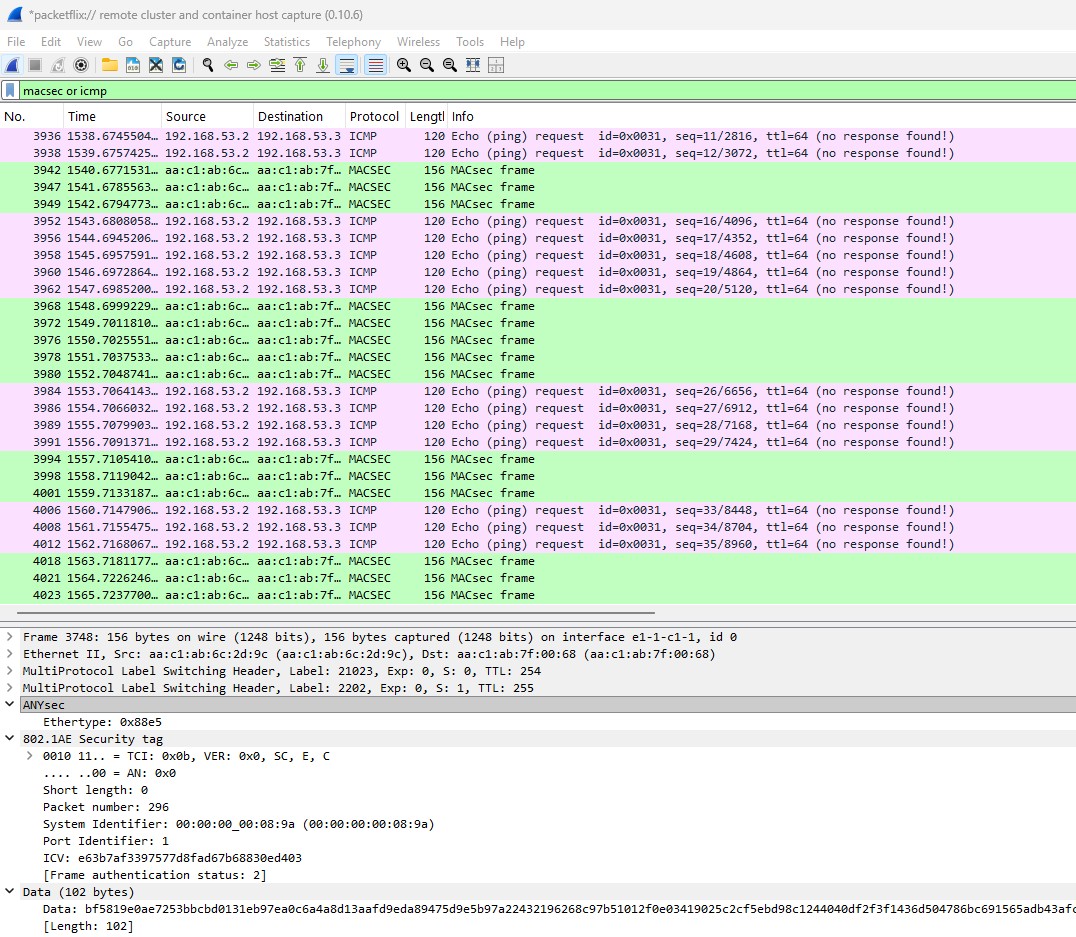
With the ping and the packet capture running for service B at PE2 and PE3 run the following script multiple times to toggle ANYsec and observe the packets switching between clear and encrypted.
If you execute the toggle script multiple times, you will observe the packets changing from encrypted to clear text as show in the fig. 6 below.
Note
As stated before, currently SR-SIM packet captures only display ingress packets and for ping requests Wireshark will report "no response found!". You may capture both sides of the link or validate the ICMP is working uninterrupted in the CLI.
ANYsec toggle script
If you have curiosity about the toggle script, you may find details below.
You may view the toggle script contents with the command below.
This is the full script.
#!/usr/bin/env bash

# --------------------------------------------------
# Toggle ANYsec on EPipe spoke-SDP (Nokia SR OS)
#
# The script performs:
#   - IF ANYsec is configured on the EPipe spoke-SDP:
#       -> remove it
#   - ELSE:
#       -> configure it with the provided encryption-group
#
# Usage:
#   ./epipe_toggle-anysec_v2.sh \
#     -t clab-srexperts-pe2,clab-srexperts-pe3 \
#     -s Svc-A_Epipe \
#     -e EG_A
#
# Assumptions:
#   - One spoke-SDP per EPipe service
#   - gnmic and jq are installed
# --------------------------------------------------

set -euo pipefail

# ---------- Defaults ----------
USERNAME="admin"
#PASSWORD="NokiaSros1!"
PASSWORD=${EVENT_PASSWORD}

# ---------- Arguments ----------
TARGETS=""
SERVICE_NAME=""
ENCRYPTION_GROUP=""

usage() {
  echo "Usage:"
  echo "  $0 -t <target1,target2,...> -s <service-name> -e <encryption-group>"
  echo
  echo "Options:"
  echo "  -t   Comma-separated list of gNMI targets (e.g.: pe2,pe3)"
  echo "  -s   EPipe service-name (e.g.: Svc-A_Epipe)"
  echo "  -e   ANYsec encryption-group name (e.g.: EG_A or EG_B)"
  exit 1
}

while getopts "t:s:e:h" opt; do
  case "$opt" in
    t) TARGETS="$OPTARG" ;;
    s) SERVICE_NAME="$OPTARG" ;;
    e) ENCRYPTION_GROUP="$OPTARG" ;;
    h) usage ;;
    *) usage ;;
  esac
done

if [[ -z "$TARGETS" || -z "$SERVICE_NAME" || -z "$ENCRYPTION_GROUP" ]]; then
  usage
fi

IFS=',' read -ra TARGET_LIST <<< "$TARGETS"

# ---------- Main loop ----------
for TARGET in "${TARGET_LIST[@]}"; do
  echo "=================================================="
  echo "Target        : $TARGET"
  echo "Service       : $SERVICE_NAME"
  echo "EncryptionGrp : $ENCRYPTION_GROUP"
  echo "--------------------------------------------------"

  # Base gnmic command for this target
  GNMIC_BASE=(
    gnmic
    -a "$TARGET"
    -u "$USERNAME"
    -p "$PASSWORD"
    --insecure
  )

  # --------------------------------------------------
  # Check if ANYsec is currently configured
  # --------------------------------------------------
  if "${GNMIC_BASE[@]}" get \
      --path "/configure/service/epipe[service-name=${SERVICE_NAME}]/spoke-sdp[sdp-bind-id=*]/anysec-encryption-group" \
    | jq -e '
        .[0].updates?
        | map(.values["configure/service/epipe/spoke-sdp/anysec-encryption-group"])
        | any(. != null)
      ' >/dev/null
  then
    # ------------------------------------------------
    # ANYsec is present -> remove it
    # ------------------------------------------------
    echo "-> Original status: ANYsec WAS configured"

    "${GNMIC_BASE[@]}" getset \
      --get "/configure/service/epipe[service-name=${SERVICE_NAME}]/spoke-sdp[sdp-bind-id=*]/anysec-encryption-group" \
      --condition '
        .[0].updates[0].values["configure/service/epipe/spoke-sdp/anysec-encryption-group"] != null
      ' \
      --delete "\"/configure/service/epipe[service-name=${SERVICE_NAME}]/spoke-sdp[sdp-bind-id=*]/anysec-encryption-group\"" \
    && echo "-> New status: ANYsec REMOVED"

  else
    # ------------------------------------------------
    # ANYsec is not present -> configure it
    # ------------------------------------------------
    echo "-> Original status: ANYsec was NOT configured"

    "${GNMIC_BASE[@]}" getset \
      --get "/configure/service/epipe[service-name=${SERVICE_NAME}]/spoke-sdp[sdp-bind-id=*]" \
      --condition '
        .[0].updates[0].values["configure/service/epipe/spoke-sdp/anysec-encryption-group"] == null
      ' \
      --update '
        .[0].updates[0].Path + "/anysec-encryption-group"
      ' \
      --value "\"${ENCRYPTION_GROUP}\"" \
    && echo "-> New status: ANYsec CONFIGURED"
  fi

  echo "Done for $TARGET"
  echo "=================================================="
done

echo "Toggle ANYsec completed for all targets"
The script execution should return the following output:
$ bash ~/SReXperts/activities/activity-19/epipe_toggle-anysec_v2.sh \
  -t clab-srexperts-pe2,clab-srexperts-pe3  \
  -s Svc-B_Epipe \
  -e EG_B
==================================================
Target        : clab-srexperts-pe2
Service       : Svc-B_Epipe
EncryptionGrp : EG_B
--------------------------------------------------
-> Original status: ANYsec WAS configured
[
  {
    "source": "clab-srexperts-pe2",
    "timestamp": 1778677893858975431,
    "time": "2026-05-13T13:11:33.858975431Z",
    "updates": [
      {
        "Path": "configure/service/epipe[service-name=Svc-B_Epipe]/spoke-sdp[sdp-bind-id=2333:1003]/anysec-encryption-group",
        "values": {
          "configure/service/epipe/spoke-sdp/anysec-encryption-group": "EG_B"
        }
      }
    ]
  }
]
{
  "source": "clab-srexperts-pe2",
  "timestamp": 1778677894176587774,
  "time": "2026-05-13T13:11:34.176587774Z",
  "results": [
    {
      "operation": "DELETE",
      "path": "configure/service/epipe[service-name=Svc-B_Epipe]/spoke-sdp[sdp-bind-id=*]/anysec-encryption-group"
    }
  ]
}
-> New status: ANYsec REMOVED
Done for clab-srexperts-pe2
==================================================
==================================================
Target        : clab-srexperts-pe3
Service       : Svc-B_Epipe
EncryptionGrp : EG_B
--------------------------------------------------
-> Original status: ANYsec WAS configured
[
  {
    "source": "clab-srexperts-pe3",
    "timestamp": 1778677894379372259,
    "time": "2026-05-13T13:11:34.379372259Z",
    "updates": [
      {
        "Path": "configure/service/epipe[service-name=Svc-B_Epipe]/spoke-sdp[sdp-bind-id=2222:1003]/anysec-encryption-group",
        "values": {
          "configure/service/epipe/spoke-sdp/anysec-encryption-group": "EG_B"
        }
      }
    ]
  }
]
{
  "source": "clab-srexperts-pe3",
  "timestamp": 1778677894699269089,
  "time": "2026-05-13T13:11:34.699269089Z",
  "results": [
    {
      "operation": "DELETE",
      "path": "configure/service/epipe[service-name=Svc-B_Epipe]/spoke-sdp[sdp-bind-id=*]/anysec-encryption-group"
    }
  ]
}
-> New status: ANYsec REMOVED
Done for clab-srexperts-pe3
==================================================
Toggle ANYsec completed for all targets
5. Summary and Review#
Congratulations! If you have got this far you have completed this activity and achieved the following:
- You have turned your network into a Quantum-Safe Network (QSN)!
- You have learned what ANYsec brings to the table in a modern networking environment
- You have configured ANYsec per service encryption in model-driven FP5-based SR OS routers with
gnmic - You have used EdgeShark to inspect encrypted data and the header label stack
- You have used used
gnmic diffto troubleshoot by comparing node configurations - You have automated the configuration, toggle encryption and tested failure scenarios
This is a pretty extensive list of achievements! Well done!
If you are interested in Post Quantum Computing (PQC) you may try the MACsec activity.
If you're hungry for more have a go at another activity! Perhaps try a topic that is new to you?