Custom gRPC Service#
| Activity name | Custom gRPC Service |
| Activity ID | 159 |
| Short Description | Implement a custom RPC service in your SR OS nodes to streamline addressing a specific information need. |
| Difficulty | Advanced |
| Tools used | MicroPython pySROS Python grpcio-tools |
| Topology Nodes | PE2 |
| References | pySROS SR OS System Management Guide Protobuf |
1. Objective#
A recent evaluation of your network's automation and management stack showed that there is still a large amount of SSH and NETCONF being exchanged with the nodes by customized scripts and tools. Following this, a request to evaluate a potential replacement of SSH and NETCONF with gRPC-based solutions has hit your desk. As gRPC is already in use for streaming telemetry in your network, moving over to using gRPC as the single way of accessing your network seems to be the long-term goal pending this evaluation's result.
Fortunately, you have just completed your yearly software upgrade cycle, landing your model-driven SR OS routers on release 26.3.R1. In this release, a new feature was introduced that allows the routers to implement custom gRPC server APIs based on inputs you deliver. That feature shows significant promise in reducing the amount of direct commands that need to be run in the network.
As it stands, your aim is to use that feature to replace a CLI-based solution currently in place that collects how many ports are available for customer services on a given PE node. You can avoid needless CLI connections to the node, funnel them through your gRPC API, and ultimately explore offering access to this API to others as you are completely in control of what it can and can not do.
2. Technology explanation#
In this activity you will be defining a gRPC service, coding a client to make use of it and setting up PE2 to act as a server for your service. This section introduces a few concepts that relate to the activity and some additional reading is proposed. This section is not strictly required to continue on with the activity and serves mainly as a reference.
2.1 gRPC and network services#
Defined as a recursive acronym, gRPC is a Remote Procedure Call (RPC) framework that allows different applications or systems to interact with each other as if they were calling local functions. It uses HTTP/2 for efficient transport and Protocol Buffers for serialization. Within these Protocol Buffer schemas we find the terms that will be used throughout the remainder of this document: a schema defines one or more services that each may have one or more RPC methods. These RPCs exchange data through messages that define the structure of requests sent and responses received.
Several well-known gRPC services exist. The most prominent is likely gNMI (used for telemetry and configuration management). The gNMI protocol buffer definition is available here. Similar self-documenting definitions are provided for other services, including gNOI, gNSI and gRIBi, they provide useful insight into how gRPC services are structured and implemented.
You can find some more information about gRPC here.
2.2 Protocol buffers#
Often abbreviated as protobuf, protocol buffers are a language, and platform-neutral mechanism for serializing structured data. The serialized binary format is compact, making it faster and more efficient than text-based formats like JSON. They allow data models to be defined in schema files, which can be used to generate code for a number of programming languages. For example, a client written in Python can interact with a server written in Go. The two parties only need access to the schema, which acts as a contract defining how they communicate.
A typical workflow involves defining data structures in a .proto file, compiling them with protoc, and then using them in client- and server-side implementations. One of the core concepts of these schemas is that the typed fields in messages are identified by unique numeric tags. Forward and backward compatibility can be enabled via these numeric tags, provided that field numbers are not reused.
Several versions of the syntax exist, with proto3 being the most widely used today. Specifying the syntax version is one of the required elements of a schema definition. A good example of a protocol buffer schema is the one used for gNMI. You can find additional reading about the history of protocol buffers here while documentation and hints on using them can be found here.
2.3 Custom gRPC services in SR OS#
Model-driven SR OS now allows users to create customized gRPC-based APIs based on compiled proto files, using Python and pySROS to implement the required behavior on the router. This image summarizes the possible interactions:
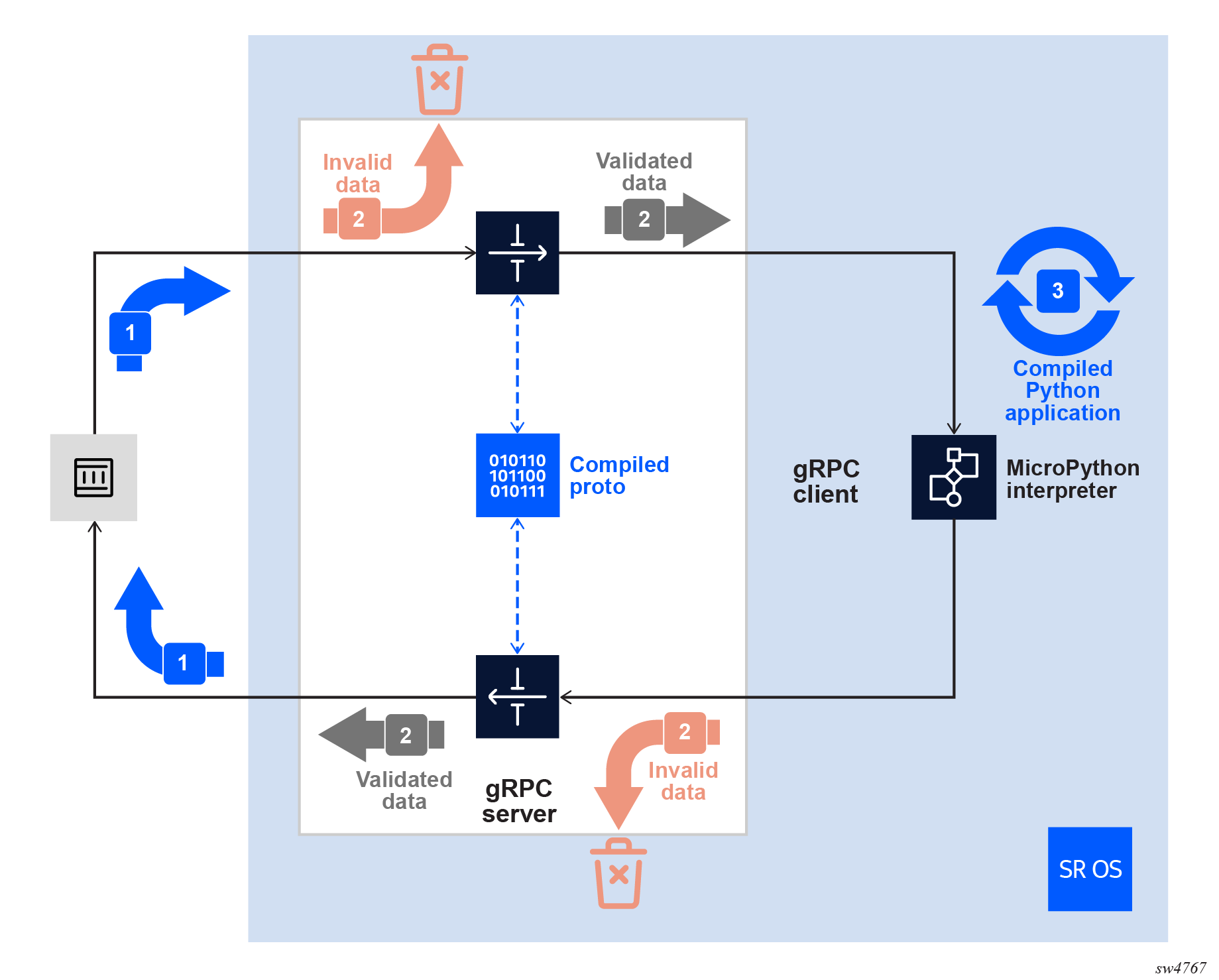
Additional reading is available in the SR OS System Management Guide, and the pySROS details for the back-end implementation are in the pySROS documentation.
3. Tasks#
You should read these tasks from top-to-bottom before beginning the activity.
It is tempting to skip ahead but tasks may require you to have completed previous tasks before tackling them.
In this activity you will:
- Create protobuf definitions for a simple gRPC service that replies to a message
- Add the gRPC service to SR OS' gRPC server
- Create a Python script to serve as your gRPC service's back-end logic
- Test your custom gRPC service
- Create a second RPC and messages that go along with it so your service can be used to retrieve available customer port information
3.1 Simple gRPC service protocol buffers#
As you will see in this section, creating a gRPC service requires some steps in which you will define the offered service, available methods and available message formats for those methods before you can think about the client and server implementations.
3.1.1 Creating the .proto file#
For any gRPC-based implementation, both the client and server should agree on the schema to use beforehand. Before tackling more complicated applications, try to implement a simple Echo gRPC service where the client will send a message containing a string value and the server will send a reply containing Server repeats: followed by that same string.
Start by creating a text file named activity.proto on your group's hackathon instance or in your preferred environment. Define your service in that file. Pick names that suit you.
Naming a gRPC service
You will need to name the following:
- The package
- The service
- The RPC
- The request
- The response
You might be able to use the gnmi.proto file for inspiration.
Choosing names
The proposed ActivityService service can go in a package simply called activity. The single defined RPC can be Echo with input message type EchoRequest and returned message type EchoReply. Each of these messages contains a single string attribute named message, identified by the tag 1.
Only if you get stuck: solution
As long as you adhere to correct .proto formatting, your solution should work for the remainder of this task. In order to benchmark the remainder of this activity a possible solution for reference is included here.
syntax = "proto3";

package activity;

// Your custom service definition
service ActivityService {
  // Send a message and expect a reply
  rpc Echo (EchoRequest) returns (EchoReply);
}

// The request contains a message
message EchoRequest {
  string message = 1;
}

// The reply contains a message too
message EchoReply {
  string message = 1;
}
3.1.2 Compiling the .proto file#
Before your protocol buffer can be used, it will have to be compiled into code that can be used by your platforms of choice. As the SR OS documentation describes, and with model-driven SR OS as your server, compilation can be done using the protoc application. The resulting .protoc is programming-language-independent and ready to be uploaded and used. Many programming languages provide wrappers around protoc, handling the call, dependencies and generated output in a language-friendly way.
For the client side, the language independent approach is less convenient than compiling the .proto file directly to suitable bindings for your programming language of choice. These bindings are generated code in the target programming language that implement classes and methods to serialize, deserialize and manipulate your protobuf messages. These files are created ready for import and use in your client- and server-side code. In this activity that will only be relevant for the client side as the server side is handled by SR OS. If you were to implement a gRPC server from scratch to serve up your own custom API, these language-specific bindings can be used for the server side as well.
For this activity, Python is used as the programming language of choice. Feel free to deviate from this if you would like to do this with another programming language, as many languages are supported.
Many resources exist online that show you how you can compile the .proto file into the files you will need. For reference, the required files (for the Python-based approach) include at least the following:
| File | Purpose |
|---|---|
activity.protoc | a binary descriptor file containing your message definitions, service(s) and the entire schema you built in the previous task. |
activity_pb2.py | a Python file that can be imported, containing the proto schema as a consumable Python API with an embedded compiled descriptor |
activity_pb2_grpc.py | another Python file, containing classes that can represent the client and server in line with what is defined in your schema. These classes know about the services, messages, and RPC methods defined in your schema. |
Compiling Protocol Buffers
To compile the files, you can use the protoc program or look for language-specific tooling. While suitable for the protocol buffer message bindings, protoc can not generate gRPC-specific bindings for programming languages on its own and requires external plugins. In Python's case, this plugin is included along with a wrapper for protoc in the grpcio-tools package. It has already been pre-installed in your group's hackathon instance.
Using the built-in Python grpc_tools wrapper for protoc, the command to generate the three required files is the following:
mkdir artifacts
python -m grpc_tools.protoc -I . --python_out=artifacts/ --grpc_python_out=artifacts/\
        --descriptor_set_out=artifacts/activity.protoc activity.proto
You could use protoc to generate the descriptor separately, however it doesn't include the functionality for generating the Python files listed above so using the wrapper is preferred.
Dry-running functionality
Optionally, you could implement and test the client- and server-side of your gRPC service already using the files you have now generated. This would allow you to dry-run and test the implementation before SR OS is introduced and would allow you to create and test your implementation logic before configuring the router. If you choose to take this approach, be aware that the client-side implementation can remain largely the same when integrating SR OS as gRPC server while the server-side implementation will require some adjustments.
3.2 SR OS as a custom gRPC server#
Now that you have the schema files ready, start configuring your target model-driven SR OS device to serve your custom gRPC service. This is done in two steps, part in configuration and part in a Python script.
3.2.1 Configuring your gRPC service on SR OS#
As the first step towards setting up a custom gRPC service on SR OS, look at the node configuration to see what you can do. Log in to your group's PE2 node and use the tree command to get an initial idea of where you might need to look to get this done.
Conceptually, the following configuration updates are required:
| Allow use of the custom gRPC service | The custom-proto leaf in the user's assigned profile is set to deny access by default. |
A python-script object | This object represents your server-side implementation. It is configured with a URL pointing to your Python script. |
gRPC custom-proto | A newly introduced configuration container linking your gRPC service interface to the correct back-end implementation. |
As you will notice when creating the necessary configuration entries, the custom-proto definition references the compiled protobuf descriptor you created previously. It also references a python-script object which is a Python script file that SR OS reads from a file and then keeps in memory. In the next section you will populate this file so don't worry about the contents yet, just be aware of it when you update the configuration.
Steps to follow
- Upload your compiled protobuf descriptor file to PE2. This file must be on a local flash card. For this activity, use
cf3:/. - Create a Python file with some placeholder content (e.g.
pass) that is accessible for your router. You could usecf3:/or any location accessible via FTP or TFTP. - Configure an in-memory
python-scriptand reference the script you will work on in the next section in theurlsattribute. - Allow use of
custom-protoin your system'sadministrativeprofile, as this is denied by default. - Configure the service as a
custom-protoin the/configure/system/grpccontext, referencing both your uploaded descriptor file incf3:/and the createdpython-script.
An empty Python file?
While the content of the Python file is irrelevant as there is no client-side functionality yet, having correct Python code in the file allows the associated object to be valid and operationally up in the system. Some of the configurations you're doing reference the script and are influenced by its state. If the script is down that may obscure misconfigurations at this stage.
Verification commands and expected changes
2026-05-14T11:37:17.21+00:00
[/]
A:admin@g3-pe2# /show python python-script "activity"
===============================================================================
Python script "activity"
===============================================================================
Description : (Not Specified)
Admin state : inService
Oper state : inService
Oper state
(distributed) : inService
Version : python3
Action on fail: drop
Protection : none
Primary URL : cf3:/activity-server.py
Secondary URL : (Not Specified)
Tertiary URL : (Not Specified)
Active URL : primary
Run as user : (Not Specified)
Code size : 24
Last changed : 05/14/2026 11:37:22
===============================================================================
2026-05-14T11:37:57.77+00:00
[/]
A:admin@g3-pe2# info /state python python-script "activity"
oper-state up
oper-state-distributed up
code-size 24
active-url primary
reload-action not-applicable
2026-05-14T11:38:01.16+00:00
[/]
A:admin@g3-pe2# /show system grpc custom-proto "activity"
===============================================================================
gRPC custom-proto "activity"
===============================================================================
Description : (Not Specified)
Administrative State : Enabled
Operational State : Up
Primary URL : cf3:\activity.protoc
Secondary URL : (Not Specified)
Tertiary URL : (Not Specified)
Active URL : primary
File Size : 188 bytes
Hmac-sha512 Hash : b19a462f95b9a624a1c44f1745422f832b2825ec3b6cc8b013a
c7a73f42c5a168b5767ed8e2ddb8943788275fcf30566d3e884
65b335178da7bc2d6a65fe1cbc
Last Changed : 2026/05/14 11:37:22
Python Script : activity
===============================================================================
2026-05-14T11:38:05.65+00:00
[/]
A:admin@g3-pe2# info /state system grpc custom-proto "activity"
oper-state up
file-size 188
last-changed 2026-05-14T11:37:22.4+00:00
active-url "cf3:\activity.protoc"
hmac-sha512-hash b19a462f95b9a624a1c44f1745422f832b2825ec3b6cc8b013ac7a73f42c5a168b5767ed8e2ddb8943788275fcf30566d3e88465b335178da7bc2d6a65fe1cbc
package "activity" {
service "ActivityService" {
statistics {
successful-msgs-in 0
successful-msgs-out 0
successful-rpcs 0
error-msgs-in 0
error-msgs-out 0
error-rpcs 0
}
rpc "Echo" {
statistics {
successful-msgs-in 0
successful-msgs-out 0
successful-rpcs 0
error-msgs-in 0
error-msgs-out 0
error-rpcs 0
}
}
}
}
Containerlab binds
Arguably, you could copy activity.protoc to the node via the containerlab mount as done for the Python script, although since that file is not to be modified that makes little difference. For the Python file you may require several iterations and in that case having it in a location you can point your IDE at for remote file modification could be convenient.
# Copy the descriptor to PE2
scp artifacts/activity.protoc admin@clab-srexperts-pe2:cf3:
# Create a Python script (this file will appear as if it is on cf3:/ in the router)
echo "pass" > /home/nokia/SReXperts/clab/clab-srexperts/pe2/A/config/cf3/activity-server.py
# Alternatively, you could create a file to be accessed using (T)FTP via the management address
# echo "pass" > /home/nokia/activity-server.py
# though note there is no FTP server active in your group's hackathon instance and you would have to set it up
/configure python python-script "activity" admin-state enable
/configure python python-script "activity" urls ["cf3:/activity-server.py"]
/configure python python-script "activity" version python3
/configure system grpc custom-proto "activity" admin-state enable
/configure system grpc custom-proto "activity" urls ["cf3:\activity.protoc"]
/configure system grpc custom-proto "activity" python-script "activity"
/configure system security aaa local-profiles profile "administrative" grpc custom-proto permit
3.2.2 Server-side Python implementation#
The Python script created in the previous section, while valid, does not meet the requirements of a backend Python script for a custom-proto service. In this section you will fill in the Python code and then make sure everything looks operational from the router's perspective.
From the pySROS documentation on this subject, the high-level flow of a completed script should be:
- Identify the services that you are implementing
- For each of those services, identify the individual RPCs you will be implementing
- For each of those RPCs:
- Implement the logic in a function in your Python script
- Call
grpcserver.add_handlerand add the function as a callback
- Make sure the in-memory
python-scriptobject contains the updated version of your code - Ensure that, when your script is executed,
grpcserver.handle_rpc()is invoked.
When implementing your function, consider that it will be called with two parameters. The first is a dictionary containing all input parameters specified by the gRPC client when it sent the request. The second is an RPC context that can be used to raise an error back to the client.
Although necessary and useful, the latter is outside the scope of this activity. In contrast, interpreting the former is required to be able to send back the input message to the client for your gRPC service.
In practical terms
For the example service (may vary depending on your chosen names), that means you will have to implement a handler for the ActivityService service from the activity package with associated Echo RPC. This should be linked to a function whose signature generally is along the lines of function(param1: dict, param2_context: grpcserver.Context).
Don't forget to import grpcserver in your code!
Whenever you decide to make changes to your service definition, the compiled version on the router (activity.protoc, or similar) will need to be updated. After replacing the file you can reload the new version into the router with
Similarly, any changes you make to your Python code can be loaded into the python-script object using
When you have implemented the Python code, use verification commands to ensure everything looks healthy. These commands might include any or all of the following:
/show python python-script "activity"

info /state python python-script "activity"

/show system grpc custom-proto "activity"

info /state system grpc custom-proto "activity"
3.3 Make use of your gRPC service#
Now that you know your router is ready, create a client implementation to use your custom gRPC service. Depending on what you prefer and have been using so far, you can do this on any development environment of your choosing. As shown using the show-ports command, the SR OS gRPC server is exposed on a public port on your group's hackathon instance. For the example implementation the assumed development environment is your group's hackathon instance.
Recall that three individual files were generated previously, and only one of those is in use so far. To build the client side, you will require the remaining two files as well as the Python grpc library.
File relations
As the two remaining files (activity_pb2_grpc.py and activity_pb2.py) will need to be imported into your client-side code, it will be more convenient to create your code in the same directory as where these generated files are. Previously, the artifacts directory was created for this purpose, it should currently contain the generated files.
The grpc library will be used to create a session with the gRPC server on PE2. The other files are needed to generate, send and receive messages in the format defined in your protocol buffer schema earlier on. Create a Python script in your development environment that does the following:
- Connects to the gRPC server on PE2 (using insecure gRPC on port 57400).
- Create a client object from the client stub generated previously (part of the
activity_pb2_grpc.pyfile), using the already created channel. - Create an
EchoRequest(part of theactivity_pb2.pyfile), with a message included as parameter. - Use the client object to send the request, making sure to pass metadata (modeled as key-value pairs, directly translating to HTTP/2 headers) to the call so that your client can be authenticated by PE2.
- The return value of this call will be the response of the server. Inspect it to make sure it contains the expected data.
Debugging the server side
The client may not show any errors or output, if there are any issues in the implementation so far. There are some things you can do on PE2 to troubleshoot any issues you may see. Using debug logs, you could expose your server script execution outputs and results. You can enable your Python script's debug logging with
To collect the logs, create a log destination:
/configure log log-id "21" admin-state enable
/configure log log-id "21" source debug true
/configure { log log-id "21" destination cli }
You will be able to subscribe to the log to expose any logs generated by your Python script as they occur using
You can unsubscribe by using
Only if you get stuck: solution
If your schema matches the example given above and the files and configuration used by SR OS are as they should be, the expected output and implementation for both client and server given below should work for your situation as well.
Note that, while not explicitly highlighted, the type of the object returned by the Echo call is activity_pb2.EchoReply - this is where the message attribute is defined.
import grpcserver
from pysros.management import connect

def respond(param1, param2):
    return {"message": getName() + " received " + param1["message"]}

def getName():
    conn = connect()
    sysName = conn.running.get('/state/system/oper-name')
    return sysName

def main():
    grpcserver.add_handler(service="ActivityService", rpc="Echo", package="activity", handler=respond)
    grpcserver.handle_rpc()

if __name__ == "__main__":
    main()
import os
import grpc
import activity_pb2
import activity_pb2_grpc

def run():
    channel = grpc.insecure_channel("pe2:57400")

    client = activity_pb2_grpc.ActivityServiceStub(channel)
    request = activity_pb2.EchoRequest(message="Hello, gRPC!")
    auth_data = [
      ("username", "admin"),
      ("password", os.getenv("EVENT_PASSWORD")),
    ]
    response = client.Echo(request, metadata=auth_data)
    print(f"Server replied: {response.message}")

if __name__ == "__main__":
    run()
3.4 Expanding your gRPC service#
Now that you have mastered the basic steps to implementing, configuring and using custom gRPC services with model-driven SR OS you can start tackling more complicated tasks.
For your environment, create a gRPC service that can connect to a node to determine how many of its ports are available for provisioning new customers. Consider access and hybrid mode ports only, as your organization considers those ports to be available for customer services. Some ports may already have SAPs configured in services, this means they are already in use and should not be considered free. Make sure to not accidentally include PXC ports!
While this could be solved with gRPC by using gNMI and parsing the collected data, this complicates the client-side implementation. It also can't benefit from SR OS' onboard Python interpreter having faster access to the node's /state data and being able to directly output a consolidated view, requiring the full data to be collected and parsed. Instead, add a customerPorts service to the Protocol Buffer schema you defined earlier. Limit yourself to a simple Get RPC that accepts no further parameters and returns a response containing only the number corresponding to the amount of free ports that are available for use as customer-facing SAPs on the node.
Depending on how you build your solution, you can configure additional unused connector ports to create more access or hybrid ports to test your implementation.
If you want to challenge yourself further, optional extensions include adding a parameter to the Get RPC to specify a card or MDA from which to collect information, or adding a Set RPC. In the latter case, on-board pySROS can be used in the server-side implementation to enable additional ports in access mode for use in service configuration.
Only if you get stuck: potential implementation
One way to implement this is given below, including the .proto definition, client- and server-side code. There shouldn't be any changes required to the SR OS configuration other than triggering reloads for any files you may need to change.
syntax = "proto3";

package activity;

// Your custom service definition
service ActivityService {
  // Send a message and expect a reply
  rpc Echo (EchoRequest) returns (EchoReply);
  rpc customerPorts (Empty) returns (PortCount);
}

// The request contains a message
message EchoRequest {
  string message = 1;
}

// The reply contains a message too
message EchoReply {
  string message = 1;
}

message Empty {
}

message PortCount {
  int32 count = 1;
}
import grpcserver
from pysros.management import connect
from pysros.wrappers import Container

def respond(param1, param2):
    return {"message": getName() + " received " + param1["message"]}

def customerPorts(rpcContents, rpcContext):
    return {"count": getCustomerPorts()}

def getName():
    conn = connect()
    sysName = conn.running.get('/state/system/oper-name')
    return sysName

def flatten(dict_input):
    result = set()
    for item in dict_input.values():
        if type(item) == type({}):
            return result | flatten(item)
        elif isinstance(item, Container):
            return result | flatten(item.data)
        else:
            return set([item.data])
    return result

def getCustomerPorts():
    conn = connect()

    portCount = 0
    portCount += len(conn.running.get('/configure/port', filter={"ethernet": {"mode": "access"}}))
    portCount += len(conn.running.get('/configure/port', filter={"ethernet": {"mode": "hybrid"}}))
    portCount -= 2*len(conn.running.get_list_keys('/configure/port-xc/pxc'))

    portsInUse=set()
    sap_filter = {
        "vprn": {
            "interface": {
                "sap": {
                    "sap-id": {}
                }
            }
        },
        "vpls": {
                "sap": {
                    "sap-id": {}
                }
            },
        "epipe": {
                "sap": {
                    "sap-id": {}
                }
            },
        "ies": {
            "interface": {
                "sap": {
                    "sap-id": {}
                }
            }
        }
    }
    # data is in a hierarchical format similar to the input filter
    filtered_sap_data = conn.running.get('/configure/service', filter=sap_filter)
    portsInUse = flatten(filtered_sap_data)
    return portCount - len(portsInUse)

def main():
    grpcserver.add_handler(handler=respond, service="ActivityService", rpc="Echo", package="activity")
    grpcserver.add_handler(handler=customerPorts, service="ActivityService", rpc="customerPorts", package="activity")
    grpcserver.handle_rpc()

if __name__ == "__main__":
    main()
import os
import grpc
import activity_pb2
import activity_pb2_grpc

def run():
    channel = grpc.insecure_channel("pe2:57400")
    client = activity_pb2_grpc.ActivityServiceStub(channel)
    request = activity_pb2.Empty()
    auth_data = [
      ("username", "admin"),
      ("password", os.getenv("EVENT_PASSWORD")),
    ]
    response = client.customerPorts(request, metadata=auth_data)
    if response.count == 1:
        print("There is 1 port available for customer use.")
    else:
        print(f"There are {response.count} ports available for customer use.")

if __name__ == "__main__":
    run()
3.5 Taking things further#
Though not explicitly part of this activity, you can see how this new feature improves SR OS' extensibility and opens doors for customization. While you added support for your own custom gRPC service in this activity, we only touched on unary RPCs. Streaming RPCs are also supported and would be something you could explore to go further.
You could also look into adding support for protocol buffer based services available online that aren't already supported in SR OS, such as gNSI/certz, as those may address some operational challenges. These may already have client implementations available.
Finally, you could explore the possibilities of more complex access control. The functionality and flexibility offered by this feature are not to be underestimated; the Python script can be configured to run as a different user than the one provided by the client, and access to the API itself can be regulated on a per-client basis as well.
4. Summary#
Congratulations! If you have made it this far, that means you can now exercise complete control over protocol buffers, gRPC clients and gRPC servers. Most notably, you have learned how to bend the gRPC server in model-driven SR OS to your will, allowing you to create customized API interfaces that fit your organizations needs.
In this activity you have:
- Written a schema for your custom gRPC service
- Compiled it into artifacts necessary to implement the service
- Configured SR OS to use your custom artifacts
- Implemented and configured back-end logic for the server
- Created a client implementation for your service
- Tested your new service end-to-end
Well done!
If you're hungry for more have a go at another activity! Perhaps try a topic that is new to you?